Angus started his first small business in 1989 and has since gone on to have a successful career in marketing. He realised although there were many websites for small business none was addressing the question of how to. Angus has a passion to articulate benefits that add value to customers/readers.
If your business is starting to look and feel a little outdated, refreshing your brand is a great way to adjust to new trends and remain contemporary. But first, decide whether your business needs just a revamp or a complete rebrand.
A rebrand can be quite a big investment that requires a lot of thought – you’re not only rehauling your look but essentially changing your business’ personality. Instead, a refresh is a simple yet effective way of taking your existing core brand message, along with the visual elements and giving them an update or mini-makeover. Vistaprint Australia’s Art Director, Bhavani Lee, shares her top tips for a simple and effective brand refresh with limited resources.
Know Your Audience
When it comes to revamping, or really any business decision, it’s important to know your audience. Knowing who you’re talking to will heavily influence what your communications look and sound like – e.g. bold colours vs. a subdued colour palette, casual vs. formal tone – and how they make customers feel. Always keep your desired audience top of mind and ensure your brand’s visual identity speaks directly to them. If you can make small improvements to relate to them, you’ll be set up for success.
Simplify Your Logo
Your logo is where your brand begins, so it’s best to keep it simple. More often than not, there will always be something that can be simplified. Remove any elements that could be distracting, like too much text or busy images. Think about some of the most iconic brands, like Nike, Apple, Google and Amazon – their logos are simple and sleek.
Experiment With Colour
Look at ways to revamp your brand by exploring the most recent colour trends and applying these where it feels appropriate. 2021 has seen a mix of neutral tones with a bright coloured accent for contrast and impact and the continued popularity of colour blocking to create interest and eye-catching visuals.
Consistency Is Key
Create a consistent look across all your marketing, both printed and digital. Whether it’s a flyer in the mail, a poster on your window, an email or an Instagram post, every time a customer comes into contact with your business, they should feel an instant connection back to your brand.
Typography Comes In Twos
Be mindful of your typography. Generally, it’s best to have just two fonts in your repertoire. Fonts can be fun to use, but mixing too many different styles, weights and sizes can quickly distract from your message as well as the visual appeal of your design.
Don’t Forget About Social Media
Extend your rebrand to social media. We all know social media is a great way to connect with your audience and share your brand’s personality, so have fun with it and use strong visuals to catch the eye of even the most avid scroller. You can also add your refreshed look to merchandise; run giveaways or competitions to engage users and get your brand in their hands.
eftpos today announced a supporting partnership of Beyond Blue as part of a $200,000 multi-year engagement encouraging all Australians to achieve their best possible mental health. The partnership will focus on funding and providing access to the Beyond Blue Support Service and aims to raise awareness about the link between financial and mental health, particularly for small businesses and young people.
eftpos CEO Stephen Benton said the alignment between eftpos and Beyond Blue’s purpose and core values was immediately clear and enormously important to both organisations.
Mr Benton said that through the partnership, eftpos would be encouraging consumers and small business owners to take steps and seek support to improve their overall mental health and wellbeing, particularly during these difficult times of COVID lockdowns and recovery.
“eftpos’ purpose is to do Good for Australia, and we see this partnership as having a direct and positive impact. By contributing to and supporting Beyond Blue’s Support Service, it is our hope we can make a difference to the lives of people in Australia, especially in these challenging times,” Mr Benton said.
“With disruptions to how we live, learn and work, we have limited access to the usual supports and coping mechanisms that help keep us well. This comes at a time where many in our community, including young people and small business owners, are also experiencing financial pressures which we know are closely tied to mental health,” Mr Benton said
Beyond Blue CEO Georgie Harman thanked eftpos for its support, with partnership donations going towards the Beyond Blue Support Service.
“eftpos’ support is vital, especially at a time when millions of people are experiencing the effects of the pandemic, including the impact on many people’s financial wellbeing,” Ms Harman said.
“Contacts to Beyond Blue’s support services are up 30 per cent on pre-pandemic levels, so we are extremely grateful to eftpos for supporting us so we can keep answering every call and online chat.
“Every dollar will go to the Beyond Blue Support Service, which is staffed around the clock by mental health professionals. They are ready to provide free, immediate and confidential counselling, advice and referrals online or over the phone. We thank eftpos for their support.”
Research shows two-thirds of small business owners say the pandemic has negatively impacted their mental health, a figure that has doubled since before the pandemic.
Even more worryingly is that small business operators support others, such as their family and staff, rather than tending to their own needs when they need support themselves.
“Along with the eftpos partnership funds going to the Beyond Blue Support Service, we’re also encouraging small business owners to find out more about Beyond Blue’s NewAccess for Small Business Owners, a program supported by trained mental health coaches who have a background in small business,” said Mr Benton.
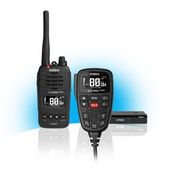
Uniden is releasing the App-enabled XTRAK Pro Series, setting a new benchmark and delivering an industry first in UHF radios for both in-car and handheld communications.
As communication is critical and remaining connected is more important than ever, the new XTRAK Pro includes in-vehicle and handheld UHF radios, both of which can track and share the user’s exact location through the XTRAK Bluetooth App.Offering both a handheld and in-vehicle UHF with location sharing is a first in the market. Users are never out of contact and are always able to talk to a friend or colleague while on the road and in remote locations.
Whether in the car with the XTRAK 80 Pro, or on foot with XTRAK 50 Pro, contact is always possible between the vehicle and handheld units, utilising the advanced positional tracking and location sharing feature for accuracy through the Uniden XTRAK app.
Designed and engineered in Japan, the Uniden XTRAK Pro features a large, high contrast anti-glare OLED display and backlit keypad on the in-vehicle UHF radio, clear and easy to read in all lighting conditions. Sound is not compromised with a powerful integrated 2-Watt speaker and 4 level voice enhancers that enable maximum sound clarity in noisy environments. Bluetooth connection is available on the XTRAK 80 Pro, connecting to the vehicle’s audio speakers.
Uniden’s innovative one-touch instant replay avoids missing important transmissions, with the ability to listen to recent communications received up to six minutes prior. This has been a popular feature of Uniden in-vehicle UHF Radios for many years and is an industry first for UHF handheld radios with the launch of the Uniden XTRAK Series. A Smart Key also helps to easily toggle between instant channel, call tone or equaliser.
Pairing with the Bluetooth XTRAK App, available for iOS and Android, is simple and immediately pinpoints a map position with the UHF radio. The App also gives access to settings controls on the radio, allowing the management of Selcall contacts and extra receive channels, as well as sending in-App text messages.
Uniden UHF radios are tough, designed and built to withstand the harshest conditions, with the magnetic microphone mount across both in-vehicle XTRAK and XTRAK Pro providing quick access and keeping the mobile safe and secure when driving. The XTRAK 50 UHF Handheld Series is waterproof, offering a range of up to 17 kilometres with 30 hours of operating time.
UHF Radio and Location Tracking in 1 – Industry first for UHF Handhelds
Industry First Instant Replay Function (Both UHF Handheld and UHF In-Vehicle)
Bluetooth App enabled
Large Anti-Glare OLED Display with Dimmer
2-Watt Speaker in Remote Microphone
80 UHF Channels
Magnetic Microphone Mount (In-car UHF Radios)
Voice Scrambler
Open/Group Scan with Priority Channel watch
5-Watt Maximum TX Output Power
Designed and Engineered in Japan
Uniden XTRAK (available from late August 2021)
XTRAK 80 – Smart UHF Radio with Large OLED Display and Instant Replay Function – $449.95 RRP
XTRAK 50 – 5-Watt Waterproof Smart UHF Handheld Radio with Large OLED Display with Instant Replay Function – $329.95 RRP
Uniden XTRAK PRO (available late September 2021)
XTRAK 80 PRO – Smart UHF Radio with Large OLED Display, Location Sharing Through App and Instant Replay – $549.95 RRP
XTRAK 50 PRO – 5-Watt Waterproof Smart UHF Handheld Radio with Large OLED Display, Location Sharing Through App and Instant Replay Function – $449.95 RRP
Customer enquiries: phone Uniden on 1300 366 895 or visit www.uniden.com.au
WeWork, the leading flexible space provider, has launched WeWork Growth Campus, a new initiative aimed at boosting Australia’s entrepreneurial start-up ecosystem.
While Australia has seen some scale-ups rise to new heights during the pandemic, COVID-19 has presented a huge challenge for startups and the community that supports them. With innovation being key to a thriving economy, Growth Campus will support the sector and its role in the region’s economic recovery.
With emerging technology businesses and entrepreneurs playing a central part in WeWork’s community, Growth Campus is built on its expertise in providing its members with the network and space to help their business grow and thrive.
With campuses across Australia and beyond, Growth Campus gathers a whole entrepreneurial community together virtually and through subsidised space. Members will have complimentary access to WeWork Labs, which offers virtual acceleration support: online access to mentoring and coaching opportunities, customised educational programming, a global network and member community, and exclusive member benefits and discounts to help them grow.
Monica Wulff, Head of WeWork Labs, Australia, Southeast Asia and South Korea, shared, “WeWork has played an integral role in many companies’ growth strategies, and as COVID-19 continues to impact the economy and disrupt the way we work, we saw the need to offer a network and workspace designed to help businesses thrive. As economic recovery evolves across the region, we can expect more companies to emphasise workspace strategy to advance productivity, collaboration and creativity.
“Founders know that building a business isn’t a solo endeavour. Through subsidised workspace, virtual mentoring, customised education and access to our global network of members, we can provide more to help startups grow and kickstart this sector.”
Growth Campus is open to start-ups, accelerators and investors of all sizes. Launched in the UK in February, the program attracted over 800 signups in the first six months, including Antler UK and Crowdcube.
Further information on how to apply for the WeWork Growth Campus can be found here.
To help support and boost growth for Australian retailers, Klarna, a leading global payments and shopping service, and the Commonwealth Bank of Australia have announced zero Klarna merchant fees for the first six months for CBA merchants who integrate with Klarna online or in-store.
In addition to waiving fees for the first six months, Klarna will also offer eligible merchants continued marketing support, working closely with them to identify opportunities to drive brand awareness and engagement through social media, Klarna media services, and in-app content and activations.
The initiative comes at what is a challenging time for Australian businesses, with the latest CBA Economics Update revealing retail trade fell 1.8 per cent in June 2021, driven by lockdowns and restrictions in Victoria and Greater Sydney.
Klarna’s Chief Expansion Officer, Camilla Giesecke, said: “With over 90 million users and more than 250,000 merchants globally, Klarna’s ambition is to become Australians’ favourite way to shop while delivering incremental growth for Australian retailers. Retail has been under pressure from the persistent nature of the pandemic, and small businesses, who are at the heart of our communities, have felt its impact most.
“Through our partnership with CBA, we are delighted to make this offer available to
retailers, big or small, as part of our broader commitment to be a growth partner for the
Australian retailers. We hope this will go some way in supporting their business in the short
term, in the lead up to peak shopping season. ”
Commonwealth Bank’s Group Executive of Business Banking Mike Vacy-Lyle said: “The pandemic continues to impact retailers across Australia, with small businesses, in particular, facing cash flow challenges as a result of the lockdowns and restrictions. We recognise that some of our small business customers, particularly those in retail industries, are where the effects of lockdowns are being most acutely felt and may need extra support.
“CBA remains committed to playing a leadership role in Australia’s economic recovery, and this forms part of our broader business support. Having supported tens of thousands of businesses in the last 18 months with repayment holidays and fee waivers, we know how valuable cash flow relief can be for businesses. We believe this initiative goes some way to providing support to businesses across the country,” he said.
Merchants can sign up for this exclusive offer through their CBA relationship manager or through an online application form on Klarna’s website.
Wired security cameras have been around for a very long time. Once, they were only for those with deep pockets and lots of technical know-how. Consumerism has changed everything, and an indoor wireless camera can be purchased at your tech retailer from $50. This guide will look at why you would use video surveillance, what you need to know and how to make your purchase decision.
A wired security camera system is one that not only has a physical cable connection but also a recording devise onsite. There will be one or more cameras and the system can be connected to the internet to review remotely.
WHY should you consider a security camera?
To secure your business or home business where once you may have installed a burglar alarm, security cameras will do this and more.
Benefits of a wired security camera
Deterring crime- A thief does not want to be caught on video
Video proof – If an incident does occur, footage can be reviewed, and police can use images
Check up on the business remotely – Is the store busy at the moment
Employee safety- Watch and review staff member behaviour to ensure safety procedures are being followed.
Insurance claims – Camera footage can validate a claim, or the camera may lead to a discount
24/7 recording – A mains power supply and onsite large storage device means all cameras can record all the time, providing you with a complete record.
Realtime large-screen viewing of camera footage. Onsite you can have a large monitor versus a small smartphone screen.
WHAT security camera technology do I need to understand?
There are wireless and wired camera solutions. A wireless camera solution uses a wireless network solution such as your Wi-Fi network to transport the video. A wireless camera may also have a battery enabling it to be completely wireless.
Advantages of a wired camera over wireless
No batteries to keep charged
No monthly fees for cloud storage are required as you have your own onsite storage
Higher quality and more reliable video versus using Wi-Fi to transport
Cables are less likely to be hacked versus a Wi-Fi signal
A cable length can reach far further than a wireless (Wi-Fi) signal
Disadvantages include installing the cable and power outages (blackouts).
There are two types of modern wired security camera systems. A DVR (Digital Video Recorder) requires an analogue coaxial video cable and a power cable. The newer NVR (Networked Video Recorder) systems use a single ethernet cable to power the camera and carry a digital video signal. Both DVRs and NVRs can connect to the internet via an ethernet cable. NVRs have the latest technology and are capable of recording at a higher video quality. NVRs also incorporate features found in wireless camera solutions, such as two-way talk and smart detection. An NVR with its extra features will be more expensive than a DVR.
HOW do I use and choose a wired security camera?
NVR/DVR setup
The setup of a wired surveillance system is very simple, except for running cables.
Select a location for the video recorder box (DVR/NVR) that has power and can accommodate a TV or monitor with an HDMI cable. For remote monitoring, you will also need internet access.
Select suitable locations for your camera, considering whether the camera can capture what you want to record.
Run the cables between the cameras and the video recorder. You may need longer cables or extensions and the assistance of an electrician. Consider the aesthetics and the vulnerability of an exposed cable being cut.
Connect your monitor via HDMI cable and the mouse to the DVR/NVR.
Follow the on-screen instructions to customise settings (such as alerts) and enable remote viewing from a smartphone app.
Familiarise yourself with recording settings and how you can playback live video as well as recorded video.
Features you should consider when buying a wired security camera:
Outdoor or indoor– If the camera is located outside, it will need to be weatherproof Camera types – There are two common types of cameras – Dome and Bullet. Both can be mounted in most locations. Bullet are normally better for long-range video, whilst dome tends to have a wider viewing angle and are suited to shorter distances. Optical zoom and pan and tilt functionality which is more expensive, will give you better live viewing options. Resolution of the camera – The higher the resolution, the better the quality of the picture and the greater ability to zoom in digitally to see details such as faces and number plates. You can choose between Standard Definition (SD), High definition (Full HD) or Ultra High Definition (UHD or 4K). Each resolution jump is 4 x the number of pixels or dots. Viewing angle of the camera – This refers to the field of vision of a camera. The larger the number represented in degrees means the camera will record a wider view in tight locations. A camera with a 90-degree viewing angle would see everything 45 degrees left and right from the centre. Low light – Also referred to as night vision, is the cameras ability to see in the dark. Most modern cameras will support this but look for the distance from the camera it will see. E.g. 10m Wireless camera’s – Some fixed camera solutions will also allow wireless cameras to be included and recorded. This has some disadvantages, as discussed above but has a massive installation advantage. Technology to stop false alerts – Normally based on measuring a heat source in the camera view, this technology is critical in reducing false alerts, especially on a windy night with moving vegetation. Alerts can also be programmed only to occur at certain times, like outside business hours. Other – various other features may be attractive to you like Siren, strobe, 2-way audio or a spotlight DVR or NVR – As discussed above Channels – This expressed as 4 channel DVR means you can connect a maximum of 4 cameras. Ensure you buy a DVR/NVR with enough channels for the cameras you require and also consider any future expansion requirements Hard drive – The DVR/NVR has an internal hard drive where all the video is stored. The larger the hard drive, the more video can be recorded, often also references as hours or days of recording. Note a higher resolution camera will require more hard drive space to record the same time frame of footage User interface of recorder (DVR/NVR) – A brochure or the marketing on a box can make a product sound very attractive. However, nothing beats doing some research to see how the user interface works and is it simple to use and will it meet your needs? Research on YouTube may prove to be useful. Display options can include rotating single images, multiple cameras at once, and 4 or 9 camera views. More advanced will be a larger image with small pictures to one side. Remote functionality of an App – A smartphone app will allow you to receive security alerts as well as provide live views from anywhere with internet coverage. This can potentially remove the need for expensive security monitoring with you having the ability to review and call the police if necessary. Multiple people can be given access to share the responsibility. Solution price and bundle options – Once you choose a brand, you will have to stay with that brand unless you start again. Price will increase with functionality, and we do recommend you go with a known brand. Once you know the number of cameras you need, you may buy a bundle to suit. Different compatible camera types can be purchased and added separately, assuming you have available channels.
HINTS
Some wired cameras will operate independently with an internet ethernet cable and no NVR. An SD card installed in the camera will capture images, as can a cloud-based backup.
As a point of comparison, we have reviewed a DVR and NVR from two well-known brands:
Swann Enforcer Security System 4 channel DVR. This Ful HD analogue recorder comes with 4 cameras and a 1TB hard drive. That 1TB drive is quoted as being able to store up to 6 months of surveillance videos giving you plenty of time to go back to review footage. The weatherproof cameras have a 90-degree viewing angle and can see 10m into the dark. By using the Swann Security app, users can access live and recorded footage from multiple Swann cameras (from wired systems to Wi-Fi standalone cameras to doorbell) and receive alerts when activity is detected. We really like the feature that the cameras have a built-in spotlight and police like red and blue flashing lights that can be activated. This is a great all in one package for a simple surveillance setup. https://www.swann.com/au/swdvk-446804sl $599.95. Swann has a range of other models including NVR capable of supporting 8 cameras.
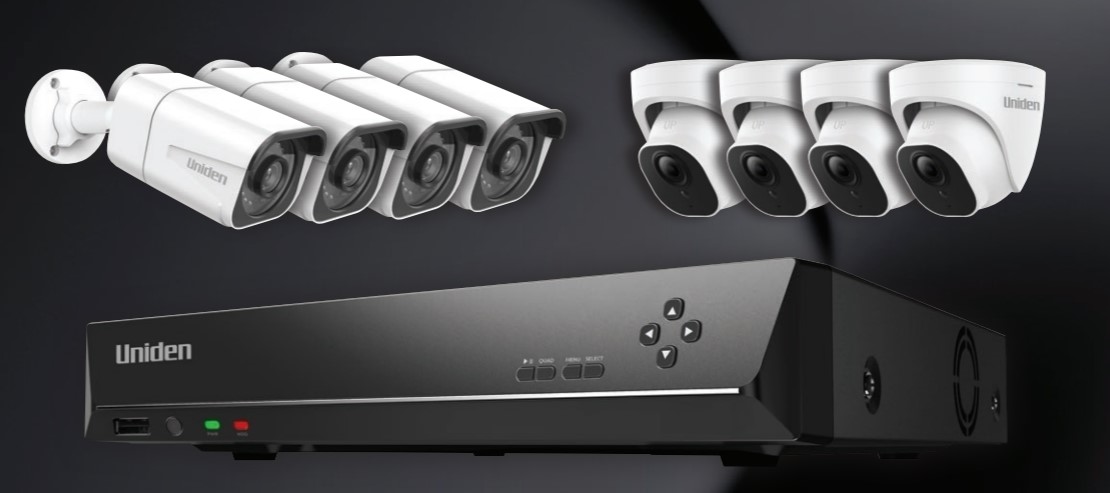
Guardian App Cam 4KNVR8 8 channel NVR. This is a 4K digital recorder with a 2TB hard drive. It does not come with any cameras; instead, you can add up to 8 fixed or wireless cameras. When used with the App Cam solo smartphone/tablet app, you can do two-way audio and receive alerts if a vehicle or person enters the field of view. https://uniden.com.au/product/guardian-app-cam-4knvr8/ $499.95 The recommended cameras are available in both a bullet or dome and have 87-degree viewing angles and up to 30m night vision. They are weatherproof and include both a speaker and microphone, allowing you to communicate with someone at the camera. https://uniden.com.au/product/guardian-app-cam-4k-bullet/ $249.95 https://uniden.com.au/product/guardian-app-cam-4k-dome/ $249.95
Alternative cameras must be mains connected and include the Guardian App Cam Home, which is wireless for the video signal. This indoors camera can pan and tilt as well as supporting a real-time conversation with two-way audio. https://uniden.com.au/product/guardian-app-cam-home/ $129.95. The Guardian App Cam Spotlight + is also wireless for the video signal. This outdoor camera includes a spotlight that will illuminate when triggered, being a great deterrent to intruders. https://uniden.com.au/product/guardian-app-cam-spotlight-plus/#1493714178990-db34738f-658e $179.95
We like this NVR solution as you have the flexibility to pick the right camera, including wireless or fixed as well as supporting audio.
SUMMARY – Wired security systems
A wired security camera allows you to have movement alerts high-quality video recordings of activity at your business 24/7. The system can act as a burglar alarm, evidence of an event or even safety monitoring. Some solutions allow integration with a wireless camera. Still, fixed are likely to be of higher quality video and more reliable. Via a smartphone app you can receive movement alerts and also view cameras in real-time. This access can be shared with others.
An out of the box solution does not require professional installation, although you may need help running cables. A configurable solution allows you to mix and match different cameras to suit your exact requirements.
Wired security cameras can be purchased directly or from office supply and electrical retailers.
If you own a restaurant or café or have suppliers or customers visiting your premises, you have probably considered offering a customer Wi-Fi network. Is it expensive? How hard is it to do? This guide will explore why you should have a guest Wi-Fi network and how easy it is to offer and ensure you secure all your data from your guests.
A customer or guest Wi-Fi network is a separately named network (or SSID) from your Wi-Fi router. This guest network will provide access to the internet but not to allow connection to any other devises on your network.
WHY should you offer a guest network?
As the price of Mobile data (internet from your mobile phone carrier) continues to fall, you could conclude that your customers could just as easily use their own data.
Reasons to offer a guest network:
Limited smartphone coverage. Customers can still access the internet if there is poor mobile phone reception. Encourage people to use their laptops. It is potentially easier to connect to a permanent Wi-Fi network than to switch on a Wi-Fi hotspot from their phone. Thus, mobile workers may come to your café to work and spend money on a coffee or lunch. Customer service. Having a supplier or customer regularly visit you is an advantage. Thus, making it easy for them to work from your premises will facilitate this. More reliable internet connection. Many factors are at play when using a mobile data connection to the internet. Wi-Fi from a high speed fixed NBN connection can be more reliable. Means to gather customer data. When logging onto a Guest Wi-Fi network, you can request customer contact data and ask permission to communicate with them. This allows you to build a database of customers to which you can market too. Customised splash page – When a customer connects to your network, it is possible to display a customised page. Here you can promote your brand, make offers and reassure customers they are on a secure network. “Free Wi-Fi”. People still feel they are getting something for free.
WHAT do I need to understand about a customer Wi-Fi network?
Each Wi-Fi base station (or effectively an antenna) has a range of between 20 to 40m line of sight. This range will dimmish with each solid item the signal must pass through, like a wall, window, chair, table etc. There is a limit to how many devices Wi-Fi can connect at once based on the number of channels and antenna’s the base station offers. A standard router will support around 30 devices. A device is anything that connects, whether a customer’s smartphone, laptop or your POS cash register.
To add more coverage and more devices, you can add a 2nd or more base stations. Your first base station must be a Wi-Fi router that acts as a policeman. Each subsequent base station offers a new Wi-Fi signal extending the range and the number of devices supported.
These additional base stations are known as Wi-Fi Extenders. Suppose your guest network extends over more than one base station. In that case, you will have different network names for your customers to connect to the network. This can be overcome with a mesh network that seamlessly roams between base stations using the same network name (SSID). A mesh network will provide a more stable and faster internet speed for users.
A Guest Wi-Fi network is a way to offer your customers easy access to the internet without also giving them access to your LAN, computers, printers, cameras etc. You do not want anyone gaining access to your accounts or using your printer for free. This means your customers will be securely partitioned from your business or home network.
Let us assume you are running a restaurant and 30 of under 16 netball competition turn up for dinner. Your guest network suddenly becomes very popular. Let us also believe that you have a POS ordering system running off Wi-Fi tablets, Wi-Fi printers in the kitchen, A Wi-Fi cloud-based cash register and your children out the back being entertained by a Netflix movie. If everyone can access bandwidth, chances are your staff will have trouble getting internet access to take the food orders.
This can be overcome by restricting the bandwidth on the guest network. Better still, if you could set up different networks (SSID) such as one for customers (guests), one for the staff POS tablets, one for the back office and one for staff’s personal use, this would be ideal. Then having the ability to adjust bandwidth between each network allows you to ensure your business is always running as it should. A home-based Wi-Fi router is unlikely to have more than two SSID’s that you can set up. A business-based router solution will enable you to have multiple SSID’s.
HOW do I choose and set up the right Wi-Fi router?
A simple guide on purchasing and setting up a router can be found here.
Your customers will want free, fast and easy-to-access Wi-Fi, so you should consider this when making your purchase decision and setting up.
Choosing a business Wi-Fi router solution:
When making your decision, you should take the following into account.
Look for an internet Wi-Fi router that is specifically designed for small businesses. This will generally mean it will have the capability to handle more devices than home and offer security features to protect your business.
Wi-Fi 6 is the latest version of the Wi-Fi standard that is available. Although most devices do no support it yet, they will moving forward, so this helps to future proof your network. Wi-Fi 6 brings several new smarts, including speed, stability and security enhancements.
Triband mesh is a technology that allows a third Wi-Fi channel to provide a dedicated backhaul for a router base station and its satellite base station to communicate. This ensures there will be no interferes with the satellite extender getting the internet bandwidth it needs. Mesh technology allows you to have a single network name across your base stations delivering Wi-Fi attached devices a more reliable and quicker connection.
The number of antennas will determine the maximum number of devices that can connect to your Wi-Fi router. The more employees and the larger the number of devices you attach to a router starts to compete for resources.
Most routers will have an App for your smartphone that will allow some control. Most of you will want set and forget functionality. Still, it is useful to have an App that offers a user-friendly interface to assess current conditions. It is also handy to deny access to a device like an ex-employee’s smartphone from your network without resetting passwords. Some routers also allow you to prioritise some devices and restrict others, which is especially useful when you prioritise your POS system for ordering or sales.
Having enough internet bandwidth is important for any business. Although not really a buying decision for your router, you should take it into account. For those businesses with very high-speed requirements such as the transfer of video. You should also ensure your Wi-Fi router can support your internet connection speeds (speeds greater than 1Gbps).
On the rear of a router, you will find several Ethernet ports. These allow cable connection to your modem (internet into your business) and devices only supporting a wired ethernet connection. Devises such a streaming TV, a fixed connection will deliver better results. Consider how many ethernet ports your router has. An ethernet switch can always be purchased to add additional ethernet ports to your setup.
Look for a router that will allow a printer or hard drive to be directly plugged into a USB port. This will give you the option to share a non-network printer and or turn a hard drive into a shared storage devise.
A Wi-Fi router designed for business is normally quite a complicated solution requiring professional setup and selection of components. However, some out-of-the-box solutions are available (we discuss one below) that are easy to set up administer and will meet most small business needs.
Ideally, you want a set and forget network that will not detract from you running your business. Look for a solution that does not require an IT expert to set it up, maintain it, and will send you alerts only when something has gone wrong. Thus you are already fixing an issue before your staff start complaining. E.g. notification that your router has lost internet connection or has been turned off.
The cost of a Wi-Fi router solution will be determined by the quality and the features. Remember that a few extra dollars spent on getting the right product the first time will save you many headaches down the track. A home network Wi-Fi router that supports a guest network can be bought for as little as $200. However, if you expect to professionally support an office or hospitality venue, you should spend $500 to $1500 the first time around.
How to set up a Guest/ customer Wi-Fi network?
Each router will have its specific setup instructions. Once you have connected the Wi-Fi router to the modem and powered up, it will set up a default network. We suggest you make the following adjustments for a business environment that can be completed through a smartphone app or an internet browser on the same network.
Separate employee and customer network names or SSID’s. This allows the quarantining of devices on different networks in your business so customers can never access your business devices, and priority can be given to network and internet resources. E.g. you might want your POS tablets to have unlimited resources but limit your customers to 1 Mbps download speeds. An ideal situation would be to have a separate network for staff, business and customers.
Passwords. Set up unique passwords for each SSID, ensuring that your customer-facing ones are easy to remember and related to your business
Limit data or time. There is a fine balance between encouraging people into your café with free Wi-Fi and what is called Wi-Fi or Internet squatters. If a customer orders a coffee, that’s great. Still, if that same customer occupies a table for 3 hours with no further purchases, that is not great. A good router should limit guests to a set time (e.g. 1hr) for free Wi-Fi and put a cap on how much data they can download.
Security. To protect your business and your customers, you should ensure that only secure logins are possible. A minimum level of encryption called WPA-2 should be enabled. This will ensure customers will not be able to see other customers network traffic.
HINTS
To improve your internet, see this guide in our sister publication GadgetGuy.
A good quality router will allow you to set up a Virtual Private Network (VPN), enabling you to access resources on your network from a remote location. E.g. access files saved on network-attached storage devise at your business from your home.
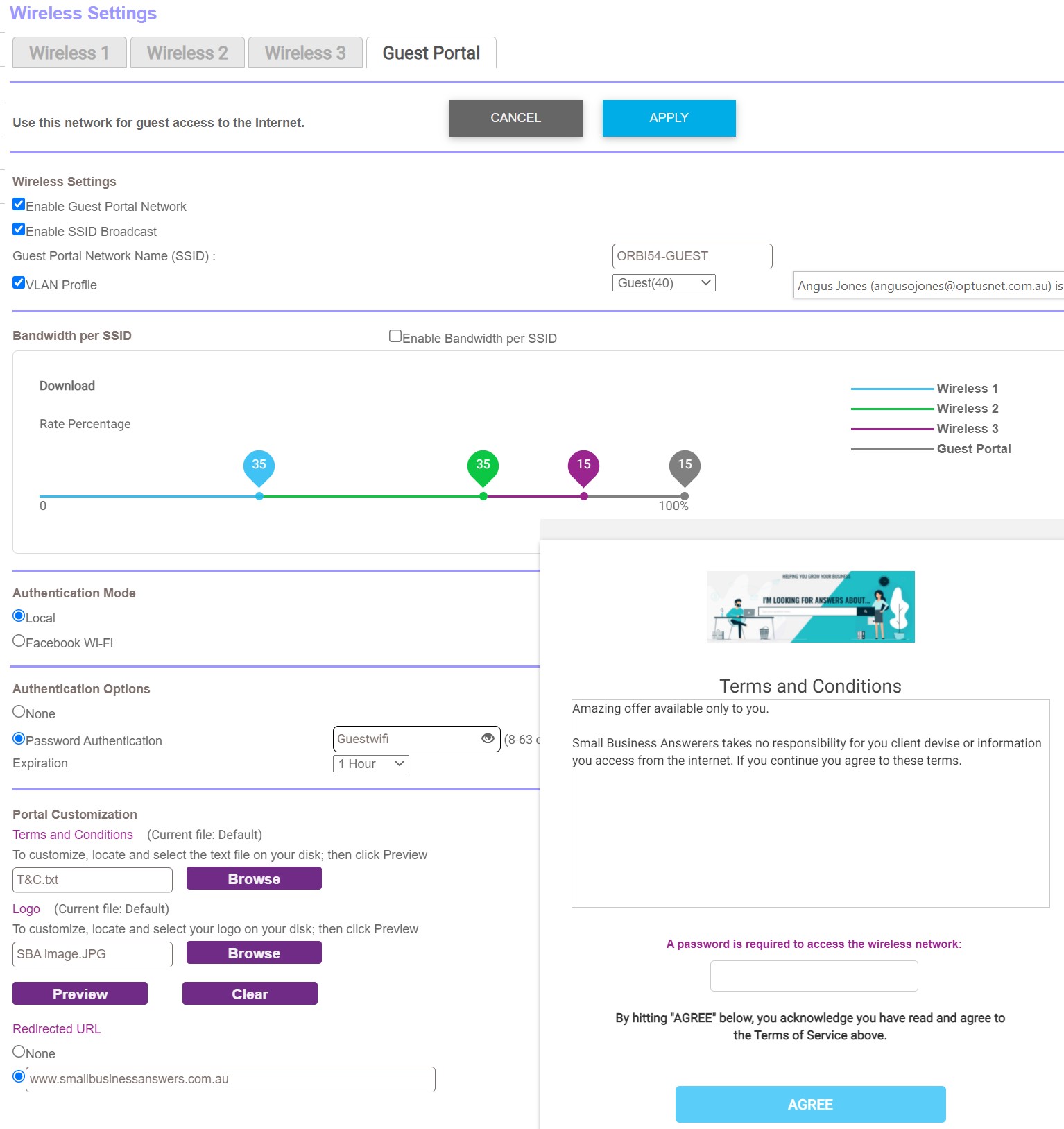
If everything discussed above is becoming a bit complicated and you feel that this is beyond you? There is a purpose-built out of the box solution that Small Business Answers has tested. The orbi PRO AX6000 from Netgear RRP $1,499 is a simple business solution that will cover up to 550 square metre premises. This latest generation Wi-Fi 6 Mesh triband router can also be expanded with additional base station satellites, all with a dedicated Wi-Fi backhaul channel. The orbi Pro will support 90 concurrent devices across four SSID’s. This means you have four business-grade secure networks for the back office, staff, IoT devices (e.gPOS) and guests. The router and the satellite each have a 1 x 2.5Gbps internet port and 4 GbE ports allowing up to 8 devices connected by ethernet cable. The Orbi Pro supports the latest security protocols, including WPA3, which means people will be safe on your network. As seen in this image, we especially like the ability to control the guest network with a splash entry page, guest SSID bandwidth control, and time limit.
The Orbi PRO uses the NETGEAR insight app to allow easy setup and management of your router. This app will alert you if the router goes offline or the internet is lost. If you are more technical and want further control and management. The orbi PRO comes with a 1-year insight subscription, which will help you manage other network devices if your network goes beyond the orbi.
Also, see our guide on IT support getting help with technology.
SUMMARY – Customer Wi-Fi network
A customer or guest Wi-Fi network is a great way to improve customer or supplier relations. If set up correctly, it will be an easy-to-use and secure internet access solution without impacting your business key network-attached business devices.
Networking a business can be a daunting proposition. Still, out of the box solutions mean the whole process can be painless. Understanding what is involved and how to make minor setting changes will ensure your business gets the most out of this technology.
New RapidReceipt RR-600W scanner and software solutions help digitise, organise and manage receipts, invoices and documents
To help ease the burden on small businesses, gig workers and consumers, Epson has launched the new RapidReceipt® RR-600W fast, easy and smart receipt and document scanning solution.
There is no denying how organising and managing financial information can be overwhelming, especially with the sheer amount of receipts, invoices, expenses, and critical paperwork that most small and home offices accumulate. It is very easy for documents to pile up. The arduous task of manually processing each one can be time-consuming and cumbersome. The result is often data-entry errors and the risk of lost data, ultimately costing businesses valuable time and money.
RapidReceipt is the only solution in the market specifically designed to organise and manage receipts and invoices. Perfect for small business owners, office managers, road warriors, field-based workers, consultants and gig economy workers who often wear multiple hats and are short on time and resources. RapidReceipt with receipt and invoice management software is a simple, cost-effective and time-saving financial management solution.
With Epson’s leading technology and success in the scanning market, the company focused its expertise on delivering a unique scanning solution to help alleviate their common pain points. Developed with very small and nimble businesses in mind. The RapidReceipt is the ultimate organised digital filing cabinet that enables easy financial document management of all types of information with incredible efficiency.
Cloud intergration to manage receipts
The RapidReceipt scanner includes Epson ScanSmart® Accounting Edition software, which converts stacks of unorganised receipts and invoices into actionable digital data. Small business owners and consumers can finally say goodbye to manually entering data because RapidReceipt software accurately extracts and organises data from receipts and invoices and seamlessly integrates into Excel® spreadsheets or third-party applications such as MYOB®, XERO®, and more. Users can also scan directly to cloud storage services such as Dropbox, Evernote, Google Drive™ and OneDrive.
A well-planned organising system can make financial management much easier. So Epson engineered RapidReceipt scanners with speed, image quality, efficiency, and low cost in mind. The RapidReceipt RR-600W wireless desktop scanner is built for productivity, capturing both sides of a document in one pass with blazing speeds as fast as 35 ppm/70 ipm.
It features a robust 100-page Auto Document Feeder accommodating stacks of paper of varying sizes and includes an intuitive 4.3″ touchscreen and convenient USB port so users can scan directly to a USB memory drive without a computer.
Included software
The RR-600W also includes a TWAIN driver for easy integration to most document management software. It includes Kofax® Power PDF® for Windows® and PDF Converter for Mac® to allow users to simply create searchable and editable PDFs, at no extra cost.
With NewSoft® Presto! BizCard® software included with the RapidReceipt RR-600W, users can easily scan business cards and manage contact information.
Epson scanners deliver amazing image quality and intelligent image adjustments with automatic cropping, blank page deletion, background removal, dirt detection, paper skew correction, and staple protection capabilities so users can scan worry-free.
Availability
The Epson RapidReceipt RR-600W desktop scanner is available now for an RRP of $699 from Epson Australia by going to: https://www.epson.com.au/rapidreceipt/ and from all authorised Epson resellers.
Sony Professional Displays is strengthening its B2B display portfolio by adding the BZ40J series in 100-inch and the BZ30J series in 75-inch, 65-inch, 55-inch, 50-inch, 43-inch and 32-inch. These new additions are designed to accommodate corporate and education environments of varying sizes, from large conference rooms and lecture halls to small meeting rooms and huddle spaces, as well as diverse digital signage applications.
The new BRAVIA Sony Professional Displays incorporate Pro Mode, enabling users to easily customise settings to suit different behaviours based on applications and environments. In contrast, One Step Setting allows for quick optimisation at the touch of a button. IP control allows for easy installation and integration through support from key partners. Additionally, the latest displays’ mirroring capabilities provide exceptional connectivity through Wi-Fi, Bluetooth and both Chromecast built-in™ and Apple AirPlay® 2, allowing for a quick and easy connection from a user’s device, allowing them to control, stream and share content simply.
Both new BRAVIA professional series boasts a powerful new System on a Chip (SoC) platform, with a built-in Android™ OS system that offers an upgraded interface for efficient ease of use, fast boot-up and seamless application integration. The new displays are thoughtfully designed with a side logo and installation-friendly terminals to provide flexibility and meet the demands of the B2B market. They also feature the latest 4K HDR processor X1™, which enhances colour, contrast, clarity and motion to produce unrivalled pictures, as well as TRILUMINOS PRO technology to produce realistic imagery with a wide range of vivid colours.
BRAVIA Professional Displays can enhance the quality of presentation materials, communications, photos and videos by conveying textures and amplifying expression through the clarity of 4K resolution and more realistic HDR colour spaces, which accurately reproduce a wide range of colours and provide high-contrast imagery. The full line-up of BRAVIA Professional Displays is available in sizes ranging from 32-inches up to 100-inches.
Pricing and Availability – Sony Professional Displays
Australia has one of the most successful superannuation systems globally, designed to provide much needed financial security to our ageing population.
Since 2014, our superannuation system, including guarantee rates, have remained largely unchanged. However, on 1 July 2021, sweeping changes to our superannuation system came into effect, including an increase in the guaranteed rate and systemic reforms.
While the aim of these changes is to improve Superannuation for all Australians, they may also increase the compliance burden on small businesses, requiring them to adapt their payroll processes and systems.
To help your business navigate these complex requirements, here’s an overview of the changes to Superannuation introduced this year and their impacts:
Superannuation Guarantee (SG) rate increase
From 1 July, the Superannuation Guarantee (SG) rate increased from 9.5% to 10%. It will rise 0.5% each year thereafter until it reaches 12% by July 2025.
While some businesses may be able to absorb the rise in costs, others may be faced with difficult decisions around how to make up for the 0.5% increase.
For businesses unable to allocate additional money toward employees’ take-home pay, it’s crucial that you are now aware that salary sacrifice arrangements cannot be used to account for the extra 0.5%.
Penalties for non-compliance
It is more important than ever to ensure your organisation is paying the correct amount of Superannuation to its employees, given the ATO’s severe penalties for non-compliance.
Underpaying an employee’s Superannuation can result in the employer paying 10% interest on the shortfall, in addition to a $20 administration fee per employee, per quarter.
In addition to the SG rate increase, from 1 July 2021, concessional superannuation caps were raised, allowing employees to voluntarily contribute more to their retirement nest egg.
For individuals, the cap on concessional contributions has increased from $25,000 a year to $27,500. At the same time, the cap on non-concessional contributions has also increased from $100,000 to $110,000 a year.
But what does this mean for small business owners?
It’s important for employers to remind their employees that concessional contributions made in excess of this amount may be subject to higher tax rates and an excess contributions charge.
In addition, the Federal Government has also set a maximum limit on paying an employee’s SG contributions. For 2021/22, the limit is $58,920 per quarter, so you only need to pay SG contributions on any amount an employee earns up to $58,920 per quarter for this financial year.
Introduction of Super Stapling
One of the most significant reforms to the superannuation system is the introduction of “Super Stapling.” From 1 November 2021, employers are obligated to make contributions to new employees existing superannuation fund if they have one. The employee will then be “stapled” to that fund, which will follow them from job to job.
The measure is designed to reduce the number of Australians with multiple superannuation accounts; however, it is also likely to place increased pressure on small businesses to keep up with the associated compliance requirements.
The introduction of super stapling means employers will need to update their onboarding process for new hires to ensure the following conditions are met:
If your new hire nominates a preferred fund, you must make superannuation payments into this account.
If your new hire does not nominate a preferred fund, you must contact the ATO to see whether the employee has an existing fund – the ‘stapled fund’ – and you must make superannuation payments into this account; or
If your new hire does not have a stapled fund and does not nominate a fund, you must create a new account with your nominated default super fund.
Phase two of Single Touch Payroll
The first phase of Single Touch Payroll (STP) was launched in 2019 for small businesses (i.e. those with 19 employees or less) as a means of reporting tax and superannuation information correctly to the ATO. From 1 January 2022, the second phase of STP will commence – six months later than initially planned.
As part of the second phase, employers will be required to report additional information through STP on or before each payday. This will extend the reach and scope of STP beyond the ATO to include Services Australia and other government agencies.
For businesses and their software vendors, making the changes necessary to provide the increased level of employee data required by STP Phase 2 will inevitably be a monumental task. To avoid issues, partner with a payroll software vendor you can trust and who can guide you through the process of significant change.
Changes to superannuation – Setting up for success
While the superannuation changes will positively impact Australians’ superannuation balances, small businesses are now faced with additional requirements to ensure payroll compliance. Amidst continuing lockdowns across much of the country and a shaky economic environment, small businesses should be looking at ways to outsource risk and compliance when it comes to their payroll systems. By investing in the right payroll technologies, small businesses should be able to mitigate the impact of the new changes to Superannuation.
Written by Luke Thomas, Product Marketing Manager, People and Payroll, The Access Group
Also, see Small Business Answers guide to Superannuation.