About Angus Jones

Angus started his first small business in 1989 and has since gone on to have a successful career in marketing. He realised although there were many websites for small business none was addressing the question of how to. Angus has a passion to articulate benefits that add value to customers/readers.

eftpos launching QR code payments

eftpos announced it had built its new QR code payments experience infrastructure on schedule, with the first commercial trials to be announced in the coming weeks. 

eftpos CEO Stephen Benton said the first stage of QR infrastructure was built in early July and was designed to provide secure and enhanced consumer purchasing and engagement experiences through loyalty, offers, receipts and added security. Testing of the new QR code infrastructure is underway, and end to end testing will be completed when the first merchant is live in August.

“There had been considerable demand to work on various QR solutions with several merchants across different business categories including entertainment, charities, and quick services restaurants, in addition to several FinTech partners, gateways, banks and digital wallet providers,” Mr Benton said. 

“It’s exciting to see the build come to life at such pace and experiencing demand beyond initial expectations. It means we can start to bring exciting new commercial applications to market sooner and aim to provide Australians with better, consistent, data-rich, digital payments experiences no matter where they choose to shop – online, on their mobile or at the checkout.” 

“There is no doubt that QR codes are now familiar to Australian retailers and consumers because of COVID. We can begin to use that experience and knowledge in new ways that create value through end to end digital wallet payment experiences that are designed here, especially for the local Australian market.” 

“The infrastructure itself is focused on building out new experiences beyond payments, addressing some common pain points, including loyalty, redemption, splitting payments and storing digital warranties, and also digital receipts – which is particularly helpful at tax return time,” Mr Benton said.

Using an agile approach, the broader eftpos Group team, leveraging its experience with QR codes in the Australian market, built the eftpos QR infrastructure quickly due to their technical expertise and familiarity with the eftpos network.

Mr Benton said eftpos was looking forward to collaborating with FinTechs and other industry partners to develop uniquely Australian solutions enhancing consumer and retail experiences to flourish in this market and drive greater value to help grow businesses.

While eftpos’ Beem It will be the first integrated QR wallet, eftpos remains wallet and partner agnostic, thus allowing consumers to initiate and transact securely with their preferred digital wallet.

eftpos’ strategy is focused on driving digital competition in Australia and choice for consumers and merchants via an integrated experience. The infrastructure allows merchants to grow their sales with low-cost eftpos QR code acceptance using enriched data and integrated customer loyalty services that can help them upsell in real-time. All by leveraging eftpos’ robust and secure Australian owned network infrastructure.

Also see Small Business Answers guide to eftpos.

City of Sydney Grants & Donations

The City will provide $5 million in grants and donations and an additional $7.8 million in estimated revenue foregone each month to provide relief through fee waivers, rent reduction, quick response grants and food security.

Lord Mayor Clover Moore said the City was preparing to revitalise the city through more outdoor dining, live music, events and performances when the health crisis has passed.

“The pandemic has had a severe impact on our community and economy. We are providing support through the crisis and ensuring we’re ready to help breathe life back into the city when lockdowns are lifted,” the Lord Mayor said.

“Funding the provision of food and masks and offering rapid response grants to community organisations and initiatives will help us support our most vulnerable.

“As restrictions ease, we will once again need to revitalise our city and attract workers and visitors back, safely. We are opening an exciting new grants program that will encourage neighbouring businesses and creatives to collaborate on events and activations that will enliven whole city precincts.

“We will continue to work closely with the NSW Government to help businesses reopen, attract patrons and operate in a Covid-safe way when the lockdown lifts.”

The state and the federal government recently announced a joint multi-billion-dollar Covid-19 support package to provide immediate financial relief for businesses across Greater Sydney. In complementing the government’s package, the City’s immediate relief and the post-lockdown package will support Sydney businesses and the economy as part of its overarching community recovery plan goals.

The grants and donations program includes:

·       $4 million in grants for businesses and creatives to collaborate on initiatives to support reactivation post-lockdown, including funding for resources to do so.

·       $8.9 million cash and value-in-kind through existing City grant programs to support economy, culture and community.

·       An additional $250,000 in new Covid-19 community emergency quick response grants to support small-scale initiatives which build the capacity of our communities to respond to the current impacts of the pandemic.

·       Donations of $300,000 each for OzHarvest and Foodbank and $100,000 for SecondBite to enable vulnerable communities to access food.

·       $50,000 for masks for vulnerable communities and increased communication to connect people with mental health and social connection support services.

·       Extension of the successful outdoor dining program and waiving of associated fees across the local government area until 30 June 2022.

·       Continuing existing fee waivers for footway dining, venue hire, banners, parking services, childcare and health and compliance activities and work with tenants in City-owned properties on rent rebates for the lockdown period, at an estimated total value of $7.8 million per month.

Donations to vulnerable communities and community emergency quick response grants will be made as soon as possible.  

The Lord Mayor said that lockdowns were taking a devastating social, health and economic toll and would require a concerted effort from all levels of government to recover from.

“The need for such drastic action highlights just how serious the situation is. It also highlights just how seriously we have been let down by the Federal Government,” the Lord Mayor said.

“We need an urgent rollout of vaccines, greater health and safety in quarantine for incoming travellers and more support for businesses and people – including the urgent reinstatement of JobKeeper.

“It is the Federal Government’s role to look after people. It is the State Government’s role to look after businesses. It is the City’s role to reinvigorate the CBD and attract workers, visitors and tourists back to support our businesses when the time comes – but we must survive before we can look to recovery.

“We can’t shut the economy down and expect people to stay home without proper support. JobKeeper helped Sydney’s businesses and workers through the worst of the first lockdown. We need it back, now. And we need vaccines and an effective campaign that tells people it’s our duty to get vaccinated – for each of us, our families, our communities, our economy and future.”

The lockdown recovery package builds on the $72.5 million support package released by the City in April 2020 for small businesses, artists and others in the creative and community sectors, and the $20 million CBD revitalisation fund established by the City and NSW government in October 2020 to boost the city centre economy and support businesses over the summer months.

Since the onset of the pandemic, the City has also operated a business concierge service to provide one-on-one advice and support to local businesses and organisations about the support available from the City of Sydney and how to access state and federal packages.

Businesses can contact our concierge service on 02 9265 9333 Monday to Friday from 9.30am to 4pm or email CityConcierge@cityofsydney.nsw.gov.au

For more information, go to https://news.cityofsydney.nsw.gov.au/articles/light-relief-through-lockdown-our-response 

Also, see Small Business Answers guide on Grants for Small Business.

D-Link AC1900 Mesh Wi-Fi Extender – Review

A Wi-Fi extender will allow you to extend the Wi-Fi coverage within your business or home. 

If you are in the market for a Wi-Fi extender, we suggest you read Small Business Answers guide to Wi-Fi extenders first.

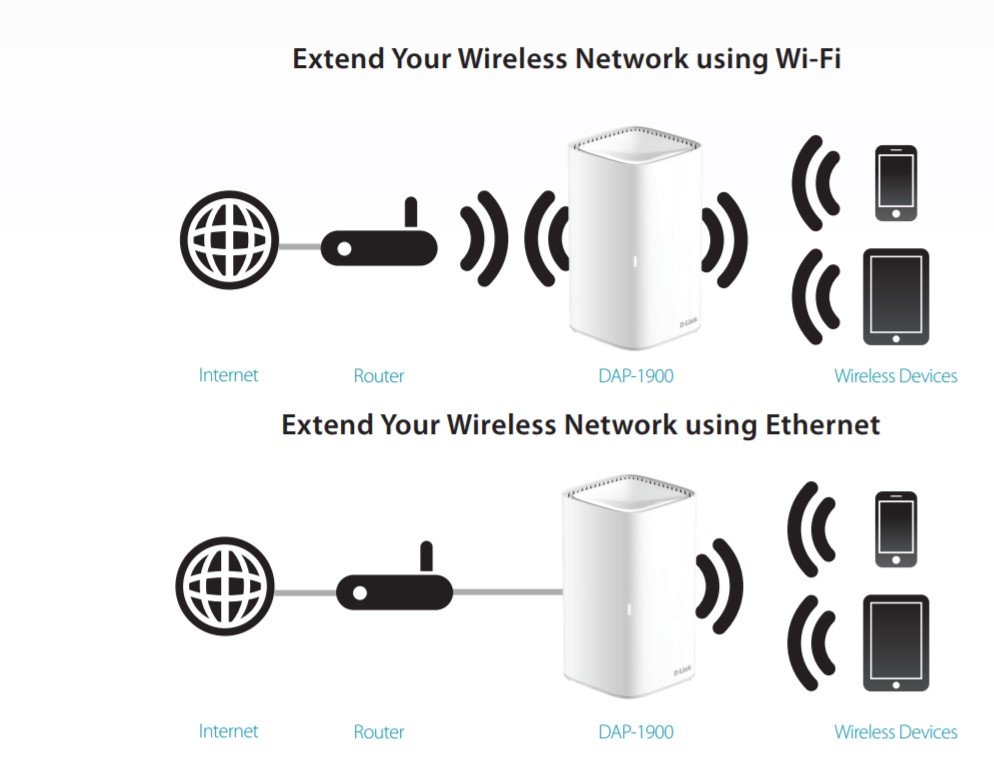
The DAP-1900 D-Link AC1900 Mesh Wi-Fi Extender allows you to overcome dead zones by retransmitting the Wi-Fi signal from your existing Wi-Fi router, as shown in the diagram below.

The setup is super easy and can be as simple as powering the extender and pressing the WPS button on your router and the extender.  A more complicated setup can be done either via an App or from an internet browser.

A more complicated setup would be if you wanted to connect the extender by ethernet, thus removing the requirement to be in the Wi-Fi range of the router or setting up a non-mesh network with a different Wi-Fi network name.

A Mesh network requires both the router and extender to support mesh and enable a common Wi-Fi network name. This means that you can seamlessly move throughout your wireless network without degradation of internet service quality.

The DAP-1900 supports a wireless AC network (802.11ac) which refers to Wi-Fi technology. Note this is 2nd latest technology and is fully backwards compatible with all previous versions.  The newest version is AX, but it is most likely if you were going to AX that you would be buying a new router as well. Thus The DAP-1900 is excellent for extending your existing  Wi-Fi router with speeds up to 1900Mbps.  A simple explanation of Wi-Fi versions is the later the version, the faster the network speed. Note it is most likely your NBN connection speed will be your weakest link having the lowest speed.

Why do we like this extender for small businesses!

Simple to set up.  You do not need to be an IT whiz to rid your workplace of Wi-Fi dead zones.

Ethernet backhaul.  You can extend your wireless network using ethernet. You could have a Wi-Fi network in a back shed or down in the warehouse where today’s Wi-Fi signal does not stretch.  You will need to run an ethernet cable which can be bought in long lengths from an office supply store, or an electrician can help you out.

Ethernet ports. Not everything in your office supports a Wi-Fi connection. A printer or network storage device may need an ethernet connection. Where your NBN is terminated, and your router is located may not be a convenient spot for that ethernet printer. The DAP-1900 has 4 ethernet ports on the rear of the unit, giving you lots of flexibility over an extender that may have zero or 1 port. It will provide ethernet connected devices with a more reliable and faster connection when combined with ethernet backhaul.

How to collect first-party data without cookies

You’ve probably noticed that a lot of the websites you visit ‘remember’ things about you. The information they store can be anything from your login credentials to items you’ve browsed, articles you’ve liked, and more. To do that, websites use what are called ‘cookies.

In February 2020, to increase consumer privacy, Google announced its plans to remove third-party cookies in the Chrome browser by 2022 – and while the tech giant recently delayed the phase-out until 2023, it’s important small-and-medium-sized businesses (SMBs) start preparing now for this new era of measurement and personalisation.

Central to this is collecting first-party data, which is information collected directly from your audience or customer base. Put simply, businesses need to find ways to earn trust from their customers, so they feel comfortable and safe to opt-in and share their data. The best place to do this is the company website.

Here are a few ways to utilise your website to collect first-party data to ultimately deliver personalised online experiences while ensuring transparency:

Optimise your website

In today’s age, experiences are currency, and audiences expect their digital experiences to be personalised, immediate, and remarkable. All while feeling that their data is being protected and respected. However, the best marketing can’t make up for a malfunctioning website. Before you invest in experimenting with different techniques for first-party data collection, utilise your current website data to ensure your online user experience is fast, easy, and seamless. Having the right technology partner like WP Engine can help drive website visitors, increase performance, and ensure your website uses the latest security updates and upgrades.

Utilise online and offline channels

Depending on your target audience, businesses can collect first-party data from a range of sources, including mobile apps, websites, social media, SMS, email, surveys, customer service interactions, CRM systems, point of purchase, and direct mail (using digital data to inform your offline campaigns). Each channel has a unique set of targeting options, allowing businesses to collect a range of data such as unique visitors and interactions, demographic data, purchase history, interests, time spent on site and more. The more channels you tap into, the more you can learn about your customers.

Reward your customers for opting-in

Businesses must educate their consumers on the benefits and positive experiences they’re going to have in exchange for sharing their data. Loyalty programs are key here. Suppose there’s a strong enough value exchange. In that case, customers will join loyalty programs to not only take advantage of discounts and vouchers but keep up to date with the brand’s new products, trends, product recommendations and other developments. The more you reward your customer, the more likely they will consider using their data for a fair exchange. Importantly, this value exchange must be enduring by protecting and respecting their data and responsibly leveraging the data they have shared.

Experiment with interactive formats

Interactive content types like quizzes, polls, and surveys have been used since the beginning of the web. Still, recently they’ve turned into an efficient marketing tool and can be a great way to learn about your customer. People love interacting with these types of formats. They’re fun, engaging, and informative if done correctly. Experiment with ways you can interact with your customers in a non-intrusive way to not only increase engagement but provide learnings about their interests and needs.

The world of digital commerce is in constant flux. To keep up with this fast-paced market, business owners must understand the importance of data collection, particularly first-party data. Collecting first-party data can be a beast, so businesses must start preparing now by putting a plan in place, optimising their website, tapping into a range of different channels, experimenting with different content formats, and most importantly, delivering a fast, secure, and convenient value exchange with customers.

Written by Helena Softley, SMB Lead at WP Engine, Australia

For more information on Cookies, refer to Small Business Answers guide to the Impact for business post cookie changes.

Maintain a strong remote work culture

While many leaders fear that remote work has already somewhat diluted their organisation’s work culture, especially as rituals and ceremonies enacted in the office are inaccessible, the reality is if a business hasn’t made morale a priority, it has likely, unfortunately, slipped.

As a direct consequence of lockdowns, most of Australia’s white-collar workforce have been working remotely or from their home offices since the start of the global pandemic. Back in May 2020, JobAdder surveyed a few of its employees to determine the appetite of returning to the office and found that 90 per cent of employees were experiencing benefits from working from home. 

Outside of JobAdder, the sentiment has remained the same for many workplaces. In fact, Employment Hero’s 2021 Remote Report found that remote work was still the most popular option (from 92 per cent in 2020 to 94 per cent in 2021). However, 31 per cent yearned for camaraderie from coworkers.

Under its “Team Anywhere” policy, Australian tech darling Atlassian announced in April this year that its team of over 5,700 staff worldwide would be able to work wherever they wanted. However, the company’s founders have made it their active mission to ensure they were building diverse distributed teams and prioritise bonds of belonging regardless of where they were working.

While the appeal for Zoom calls celebrating Friday night drinks may have faded away after the first few lockdowns, businesses are still making it their priority to ensure that team morale remains strong for remote workers. Whether through complementary therapy sessions, organising catch-ups outside of lockdown periods, or fostering inclusive ways of communications across the board, job satisfaction should remain high.

So how do SMEs bring scaling back onto the agenda when working remotely? The answer lies in the level of transparency they want to provide. 

Simply, leaders can’t expect to have a positive and consistent company culture when employees are not informed about all relevant information regarding the company. 

Ensuring the wider team is across the scaling plan, even briefly via regular team meetings, allows them to feel like they are part of the process.

When remote workforces, it’s also important that businesses establish a “one team, one dream” type of mindset. This is when everyone is working towards the same business mission and values, no matter their role or location.

Bosses can do this effectively by opening up a line of communication between different employees. 

Whether that be through a team-wide Slack channel, regular meetings, or making introductions between employees in different locations. Rather than working in silos, workers should collaborate and compare strategies and how they can be adapted for different audiences and customers.

To ensure all team members get the same experience, remote onboarding should be streamlined and implemented across all regions so that all team members are provided with the same level of attention and information across the business.

At the end of the day, people make a business. Without the right team at the helm and the right processes and lines of communications put in place, a business won’t grow without the right work culture.

By Graham Moody, Chief People Officer at JobAdder

Five Tips To Refresh Your Marketing Budget

Setting Your Marketing Budget

As a general rule of thumb, you need to be realistic about matching your budget to your goals for the year ahead. Here, suppose you’re looking to maintain your current business. In that case, you need to set aside 5-7% of total revenue for your marketing budget. To grow your business, you should be looking to spend 7-10% of your marketing budget. To really seek to aggressively gain market share, you would be looking at 10-20% for a dedicated marketing budget.

It is easy to get caught up in the doing – in fulfilment, in the product – but the key is to take a step back and be clear on what you have to play with, and then get to the business of how best to spend it.

Finding Your Audience

Digital advertising and social media ads are the fastest, most targeted and measurable ways to reach your customers. You can focus on spending money on the audiences you want to attract, be it age, location or interests. It also doesn’t require a big budget to get going (unlike a TV ad!), so there is no barrier to starting.

Just remember to be really laser-focused on who you are trying to engage. Go back to your core consumer or new audience segment and think critically about where they live (digitally!), when and what else they consume, and therefore the platforms you should test or prioritise first.

Stand Out From The Competition

Find the space where you can stand out over the next year by knowing what your brand does better or differently from your competitors and make sure this is what people see. And look at offering additional services that will help you differentiate, like free trials, subscriptions, recycling schemes of money-back guarantees. Importantly, hero these unique selling points through your marketing – from video content and photography to the content you use to explain your business online or in-store.

Remember, people don’t buy what you do. They buy why you do it. Don’t be afraid to tell your personal story. Connecting with your audience can really set you apart from your competitors.

Optimise Your Real Estate

What spaces does your business have that it can brand? Good windows turn window shoppers into foot traffic. Think of simple messaging that explains your business personality in a few quick glances. If you don’t have a store, do you have a company vehicle you can brand? Or, if you run your business outdoors, try flags, outdoor banners and wearable branding (t-shirts and hoodies).

Build Out The Experience

Think about how you can build the customer experience – from physical interactions to digital engagements. This is a sure-fire way of keeping customers coming back for more. For example, you could use your physical space for a complimentary experience (even for a limited time) or drive great 1:1 service – yoga classes and expert teams in the Lululemon store always entices me in!

Offering e-receipts or a loyalty programme will also give you a chance to capture customer details so that you can start building out your relationship and engaging over time. Email is a really inexpensive marketing channel. Consider setting up automated emails when customers first sign up to connect with them while they’re highly engaged. This could be a simple welcome note or special offers to incentivise spending more. For example, if your average order is $60, why not offer $20 when they spend $100 again this month?

On how and why these tips are fundamental for small business owners, Caroline Swarbrick, Senior Director of Marketing, Sales and Customer Experience, comments: “At Vistaprint, we understand the new financial year is an opportune time for businesses to take a deep breath and set themselves up for success for the next 12 months. Refreshing your marketing strategy is an excellent way to reposition your business and find new pathways to growth in your sector and community.

“There is a myriad of ways to approach your strategy, but the most important thing is to keep it clear and simple to develop a strategy around your own business goals. Our aim at Vistaprint is to not only provide small businesses with high-quality custom products to help execute their strategies but also share advice and help businesses better connect with both physical and digital marketing materials.”

Also, see Small business Answers guide to Marketing to grow your business.

Wired vs Bluetooth headset – Review

This is not exactly a headset shoot-out between a Wired vs Bluetooth headset. Nor is it a fair fight as one set of headphones today is without question better than the other.

However, this review is more about how much should you spend on a headset for your Zoom, teams, Google meet etc.

Certainly, over the last year, people have spent a lot of time on video calls. If you have not already, it really is time you bought yourself a decent headset.  You will hear better, and others will hear you better.

Before you read any further, check out Small Business Answers buying guide to headsets for business.

The two models we look at today are:

Jabra Evolve 2 30 online we found these for $139

Poly Voyager Focus 2 Office online we found these for $380

So the Poly’s are just short of 3 times as much. Both units have on-ear headphones and a swinging microphone.

The difference at the highest level is one is Bluetooth vs Corded. The Jabra can be bought as USB A or C at the end of the cable. If you will always be on a video call, then wired is fine because you will not be moving.  If you are doing many voice-only calls and want to walk around the house/office, the Bluetooth Polys are definitely the go.

Sound quality – This is a relative thing as they both sound good for voice and music. If you compare the two directly, the Poly’s come out on top slightly. The tested headphones do support stereo. Note some Bluetooth headphones might have a left and right speaker but still playback in mono.

Noise cancellation is a big one if you are working in a busy environment.  Whether it is kids, construction, or workmates, blocking out background noise and concentrating on the call is key.  The Poly offers 3 levels of noise cancellation. The Jabra’s have no published noise cancelling.

The weights of the headsets come in at 125grams for the Jabra and 175 grams for the Poly. Neither felt heavy, and the comfort on both units was excellent.  The more expensive Poly has a fancier headband, but I preferred the simpler and firmer Jabra’s for my head.

Buttons on the headset let you control volume, start or stop music or calls and mute the conversation.  Both units also had a dedicated Microsoft Teams button (more on that in a minute).  Personal preference again, but I did prefer the Poly. The little stuff also makes a big difference.  Pick up the Poly’s and put them on your head. A call will be automatically answered without touching any buttons.

Microphone – Just like above, where you don’t want background noise to disturb you, there is also a need to protect the others on a call from that same background noise.  The Jabra uses two microphones to help. Poly acoustic fence technology is really cool. They use microphones on the earphones to work out what noise is not coming from your mouth to the boom microphone to cut out any background noise. The simple explanation is the other con callers are unlikely to hear the screaming child.

The Battery life on the Poly is 19 hours of talk time, more than enough to get you through the day. Just in case you forgot to charge, they can be directly connected to a USB port to continue charging as well as porting audio directly.

The Poly having Bluetooth allows a mobile and a PC to be connected simultaneously, which is great to seamlessly swap between the two.  The audio experience using the headset with mobile was a big upgrade on the handset itself for sound and voice. Siri and google assist will also work with a long press of the central button.

Durability will be key to the headsets lasting and not breaking anytime soon.  With no proper way to test this, all I can say is they both surprised me how durable the builds appear to be.

Mute being the ability to mute your voice is probably my number one feature.
The Poly has a nice button on the microphone itself, and removing the headset will also mute a call. The Jabra has a button on the earphone.  The Poly will tell you audibly you are on mute if you have forgotten to remove mute and you speak. I prefer the Poly method over the optional Jabra continuous audible tone that can be switched on in your desktop software to remind you mute is activated.

Suppose you are in a business environment with multiple people. In that case, both models have a Busy light that illuminates, alerting others you are on a call.

A PC or Mac app is available for both models giving you greater control, software upgrades and better integration with your unified communications software.

Unified communications is a business term used to describe voice and messaging solutions. With the adoption of work from home, it is a must.  Both headsets are certified for Microsoft teams which then offers enhancements when using the teams’ application. Such as starting or answering a Teams call. Other models will work better with other solutions, such as Zoom, but the Teams version works fine.

Included accessories. Both units come with a carry pouch for the headset.  Not an accessory, but the Jabra was shipped in a paper bag versus a box which I consider very environment friendly. 
The Poly Voyager Focus 2 Office ships with a charging stand that allows a desk phone connection, a computer connected via USB. This really takes Poly to the top end of the headset market.

Summary – Wired headset vs Bluetooth headset

This review is not so much about Jabra vs Poly as we are not comparing like for like indeed; we could have compared a lower cost Jabra and a high-cost Poly. Instead, it is about how much should you spend to get what you need out of a headset. Which one a Wired headset vs Bluetooth headset?

If you are working from home, want to improve your voice and video calls and potentially paying for the headset yourself, the cheaper corded headsets (Jabra) are a no brainer.

If you are on calls all day, you don’t want background noise disturbing those calls. You want to get up from the chair, then the extra money for the cordless Bluetooth (Poly) is worth every cent. Especially if work is paying for them.

The Poly’s also made excellent music headphones, and although it looks a little strange, you can walk the streets on a call, and all the car noise etc., is perfectly blocked out.


Epson SureLab for business photo printing

As demand for small-format photos continues to grow, businesses are looking for a cost-effective way to deliver quality prints quickly and cost-effectively. To meet that need, Epson has launched the SureLab ® D1060. This new DryLab printer has been built to address a range of customers from wedding and event photography, to retail in-store ad-hoc printing, to back-office print houses.

It offers a more compact footprint with reduced noise, lower heat output, as well as a range of new features to suit retail and in-house photo production. It also has a faster print speed and a super-fast one-off print mode for event applications.

A new ink system is combined with more flexible networking and an extended print life for those involved with on-demand and back-office print production. Complementing all of this is a new duplex unit that enables automatic double-sided borderless printing for photobook and photo merchandise production.

“High-quality, small-format photo printing is more popular than ever. Whether you have a high-end digital camera or the latest smartphone with megapixel imaging capability, there is nothing visceral quite like a tangible printed photo of a treasured moment. People want to put photos in their family albums, on the desk and up on the wall. Moments in time are fleeting and special. There is nothing like having a memento there in front of you as a reminder of what’s truly important,” said Gordon Kerr, Business Marketing Manager, Large Format, Epson Australia, “Epson has always produced great photo printers. The SureLab D1060 is a leap forward in terms of flexibility, productivity and durability. Never before has it been easier or more cost-effective to produce quality photo prints.”

The new SureLab D1060 delivers print speeds of up to 460 6”x4” photos per hour.1 It is up to 10 per cent faster than the previous generation, and the new 15-second one-off print mode is set to be a boon for photo studios and event work.2

For improved productivity, the SureLab D1060 features a high-capacity ink system that uses 250ml bags that are cost-effective to purchase, compact to store, and crushable for reduced waste.

For single-sided printing, the machine uses large 65m roll-based media that is available in widths from 3.5”-210mm (A4) in a range of media weights and finishes.

One of the key design features of the SL-D1060 is its reduced Total Cost of Ownership. Not only has it been designed to offer worry-free operation with minimum maintenance, but it features double the print life of its predecessor. It comes with a comprehensive ‘heads-and-all’ on-site warranty that can be extended with CoverPlus for up to five years.

Pricing and Availability SureLab D1060

The SureLab D1060 is expected to be available from November 2021 in Australia. A base printer with 5 years CoverPlus is expected to cost $6,995 (RRP ex GST), while the version with the duplex unit is expected to cost $7,995 (RRP ex GST).

For information on general office, printing see our guide on printers.

Wi-Fi Extender to improve your Wi-Fi coverage

A Wi-Fi extender, just maybe the magic back box that fixes your Wi-Fi blackspots in your office, but it certainly is not a miracle cure.  This guide will explain what a Wi-Fi extender is and how it can be used to improve productivity in the office by increasing internet speed and coverage.

A Wi-Fi (range) extender, booster or repeater is used to increase the coverage area of your Wi-Fi network. It works by receiving your existing Wi-Fi signal or internet connection, and then transmitting a new signal to extend your coverage.

WHY should I consider a Wi-Fi Extender?

 We should really call this devise a Wi-Fi router extender.  A Wi-Fi router is a box that takes the internet connection you receive in your business or home and enables multiple devices to be connected to that internet. In addition, it creates a wireless broadcast so devices like a smartphone can connect to the internet.

Now picture an antenna sitting on your Wi-Fi router. This antenna can transmit a signal in a circle for up to 30 metres.  Unfortunately, every wall, desk, person, photocopier etc., in the path of that signal reduces its range.  Thus, the need for a range or Wi-Fi extender.

When using a Wi-Fi extender, the end result is to give you additional Wi-Fi coverage in an area you did not have coverage before and potentially increase the speed of connectivity to your wireless device.

More information can be found on our guide to set up a Wi-Fi network and how to improve Wi-Fi

WHAT Wi-Fi extender technologies are there?

A Wi-Fi network is identified by its network name or (SSID). This will be unique to each router out of the box but can be changed manually.

Router and extenders operate on 2 frequencies, either 2.4GHz or 5GHz.  2.4Gz is good for long-range but have lower speeds. 5Ghz is known for faster speeds but lower range.  Most devices these days will offer both.  A dual-band will have 1 x 2.4GHz and 1 x 5GHz channels. A tri-band will have 1 x 2.4GHz and 2 x 5GHz channels.

All extenders will offer one or more of the following:

Wi-Fi Mesh (single SSID) – Allows both the router and the extender to use the same network name. The communication between the two is via wireless. Extender must be in range of the router.

 Ethernet Mesh (single SSID) – Allows both the router and the extender to use the same network name. The communication between the two is an ethernet cable. The extender can be anywhere the ethernet cable reaches.

Access Point (different SSID) – Both the router and the extender will have a separate network name.  Access point could be attached by ethernet or wireless.  It is not as transparent as a Mesh solution and will not maximise speed necessarily.

HOW do I choose and install the right Wi-Fi extender

Beyond the three ways to extend your network mentioned above, there are many other features/technologies that you should consider. Our key recommendation is to consider your future needs vs what you need today. Early Wi-Fi technology has its limitations. These include speed, efficiency and the number of devices that can be properly supported. A simple explanation is older technology supported a few wireless devices. Now some networks may support 60 or more wireless devices.  Thus plan for the future both with your router and extender and the devices you attach to the network.

Look for these features:

Wi-Fi standards – The latest standard is Wi-Fi 6 or ax. Previously there was a,b,g,n,ac,ad,ah. All you need to know is a newer unit is backwards compatible, and if you buy Wi-Fi 6, your smartphone or PC must also support it to take full advantage. Wi-Fi6 is the most expensive but will futureproof you.  As a minimum, you should buy a unit supporting Wi-Fi 5, also known as ac.

LED lights – all units will have at least one light to indicate it is on and working, often changing colour to indicate its status.  If you will be connecting wirelessly, a handy feature is to buy a unit that displays signal strength from the router.  This makes placement in your premises easy as you know there is enough coverage to work properly.

Security – All models will have security and switched on as default.  Best not to turn this off as it will allow anyone to access your network.  The more modern the Wi-Fi standard, e.g. Wi-Fi6, the better the security.

Outdoors – Some vendors sell units that can be mounted outdoors and thus survive the elements.  An extender placed near a window may have the same effect.

Ethernet ports – Some models have one or more ethernet ports.  This will allow you to have an ethernet connection back to your router and /or link to a device close by that may not have Wi-Fi, like a printer.

How do I install a Wi-Fi extender?

Most banded extenders are pretty easy to set up, especially if connecting wirelessly.  You will need a power point and potentially an ethernet cable if you are connecting that way.  For a wireless connection set up, start by powering the extender up near the router. You should find a WPS (Wi-Fi Protected Setup) button on your router and your extender. WPS makes it very easy to set up a secure connection between the two without much IT knowledge. Simply press the WPS button on the router and the extender, and they will connect.  Once this is complete, most likely indicated by a green light, disconnect your extender and look for a power point half to two thirds towards your blackspot. Suppose you have the signal indicator lights mentioned above. In that case, you will soon see if the extender is in a suitable position to still receive a good signal from the router. Finally, check your client device (PC, smartphone, camera etc.) for connection in your previous black spot.  If the connection is good, you are done; otherwise, try moving your extender to another position.

HINTS

GadgetGuy has recently reviewed the D-Link DAP-X1860 AX1800 Wi-Fi 6 Mesh range extender finding it simple to set up, reliable and reasonable cost.

A mesh router and extender will allow you to have one network name. Thus your devices seamlessly connect around your premises (a bit like your smartphone seamlessly moves around suburbs without dropping a call).

SUMMARY – improve your Wi-Fi coverage

Let us say you don’t have Wi-Fi coverage in a meeting room or you need it in a warehouse.  A simple and relatively cheap solution is purchasing and installing a Wi-Fi extender that will help remove those black spots.

Electrical retailers and office supply companies will have several models varying in price.  We recommend spending a bit more and futureproofing your network.  Same brand solutions (router and extender) are most likely to work best, but different brands should also work together.

Banks offer to defer COVID loan repayments

The Australian Banking Association says banks will defer loan repayments for small businesses affected by COVID-19 lockdowns throughout Australia for three months.

“Deferred COVID loan repayments is a positive initiative that will help many struggling small businesses stay afloat in these challenging times,” says the Australian Small Business and Family Enterprise Ombudsman Bruce Billson .

“The banks’ commitment to supporting small businesses through this period is highly valued and is the kind of a key support element that could be incorporated into an agreed predictable and known national framework of support. 

“Such a framework, involving both Government and private sector elements, step up as COVID-inspired economic constraints and introduced, up-levelled or extended that small and family businesses can count on when seeking to navigate these challenging and uncertain times.

“I would encourage all small businesses owners who are experiencing financial difficulties to call their banks now to make the necessary arrangements.

“Home loan support, including deferrals on a month-by-month basis, is also available to small business customers.

“Banks are promising to support small businesses if they need it – so long as the loan is in good standing with repayments up-to-date or there’s a payment program in place.

“It’s encouraging to see our banks taking this proactive approach and leading by example.

“This consistency from the banks will help small businesses navigate and adapt to periods of uncertainty such as this.”   

See Small Business Answers guide to a small business bank account.