About Angus Jones

Angus started his first small business in 1989 and has since gone on to have a successful career in marketing. He realised although there were many websites for small business none was addressing the question of how to. Angus has a passion to articulate benefits that add value to customers/readers.

Uniden UPP1000 Jump-start Kit review

According to the NRMA (NSW car breakdown assistance), the most common causes of breakdown are flat batteries, flat tyres and running out of petrol. Cars are much more reliable now, and let’s face it, most cars carry a spare tyre and ignore the low fuel light at your peril. A flat battery is also something we can deal with, and we look at the Uniden UPP1000 jump start kit.

The Uniden UPP1000 is a rugged portable car battery jump start kit and USB power bank that will start a flat car battery.

What is a Jumpstart kit?

A portable car battery jump starter kit is everything you need to start a vehicle flat battery. The kit has a portable battery that can power a vehicle’s electrical system to enable the starter motor to start the engine.

WHY should you consider a Jumpstart kit?

Running a small business, you probably rely heavily on your vehicle for transport. If the battery goes flat due to age or simply leaving a light on, you are stranded and not making money. This can happen at any time and most likely when it is most inconvenient.

The whole kit weighs 1kg, and the carry case measures 21 x 9 x 13 cm, so it will easily fit in your glove box, underneath the seat or car boot. At the RRP of $200, it’s great insurance if you don’t have roadside assistance or the time to wait for them to arrive.

What is in the Box?

Modern Lithium battery technology means that a 10,000mAh battery can produce 250 cold cranking amps. That’s enough juice to start up a 7-litre petrol engine or a 5 Litre diesel engine. Thus, you could start a small truck(12v) with this device. An included jumper cable with large alligator clips allows you to connect to your vehicle’s 12-volt battery terminals.

The UPP1000 is also a portable power bank which means you can recharge your mobile phone, tablet or other devices that support USB charging. There are two USB-A sockets and one USB-C socket with a maximum output of 18 watts. There are even 3 USB-A cables included (to USB-C, Micro USB, and Mini USB)

To charge the Uniden, included in the package is a USB wall charger (240 volts) and a cig charger plug to use in your car’s 12-volt socket. From flat, it will take 7 to 10 hours to charge.

The Uniden battery is waterproof IP67, has a rugged impact-resistant rubber coating, and the electrical outlets are covered by a rubber grommet. This and all the accessories fit into a durable carry case.

Using the Uniden UPP1000

It is important to recognise that Uniden recommends that the UP1000 be recharged every 3 months to ensure it is ready to go when needed. A good habit may be to do this every time your BAS is due. If unused, the battery will lose 20% of its capacity annually and has a useful life of 1000 chargers.

When you recharge it, 4 external LED lights indicate the charging state. Each illuminated LED equals 25%, so 3 lit LEDs means you have 75% battery capacity.

If you need a torch in your car, the UPP1000 has a LED light that will last a very long time if you are not doing anything else. The light is also able to signal SOS.

To charge a smartphone etc., simply insert a USB. The external button on the Uniden battery pack operates merely the light.

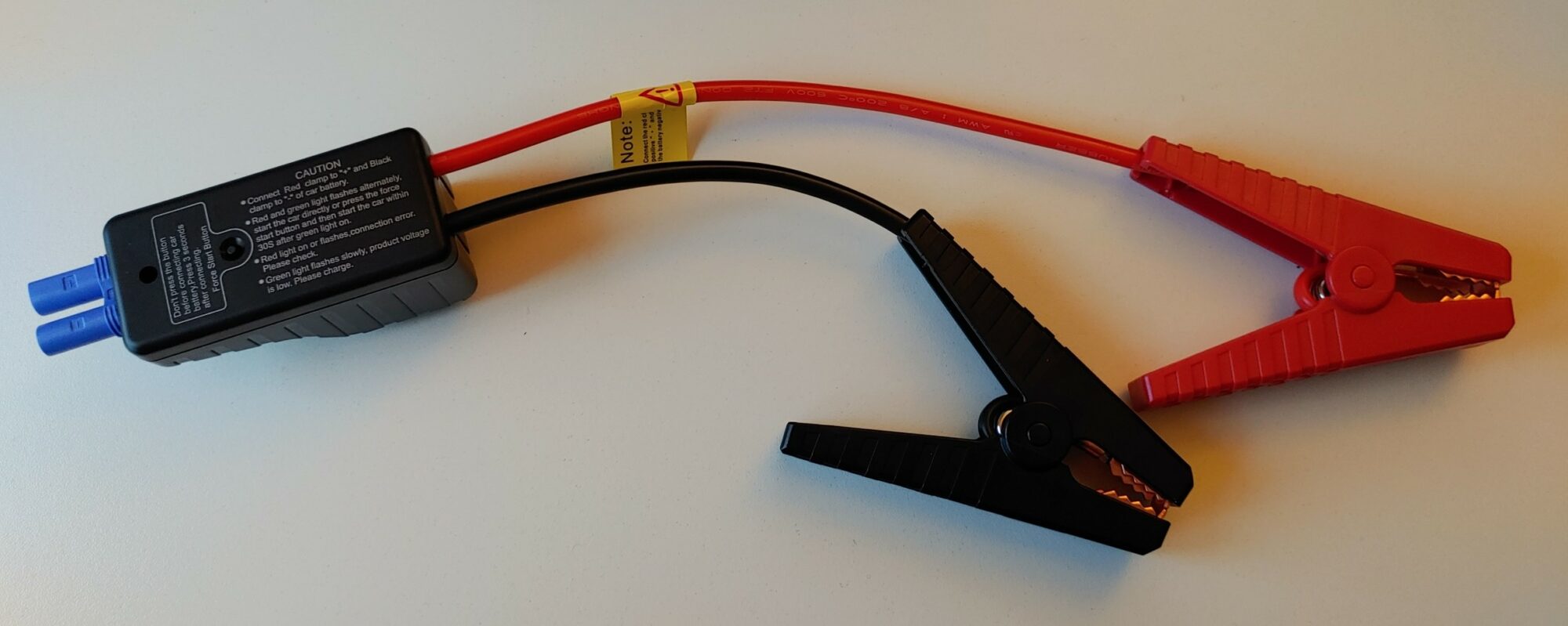
Our favourite feature is that the two alligator clips are slightly different lengths. This has nothing to do with one battery terminal being further away from the other but with ensuring the two alligator clips do not touch each other and cause a short circuit. The plug into your Uniden battery has clear instructions to help you jump-start your car versus flipping through the paper instruction manual.

Don’t stress about short circuits, as the UPP1000 has several circuit safety features to keep you and the start kit safe.

Depending on just how flat your battery is (The car still needs to have a working car battery), the Uniden has 2 modes. The first is active once you connect the blue plug of your jumper cables to the Uniden battery. Match the red and black alligator clips to your red and black car battery terminals. Once you see a red and green flashing light on the jumper cable plug, you are ready to start your car.

Uniden recommends that you disconnect the jumper leads and wait 30 seconds between each additional attempt to start your car. After 3 attempts, you can try the 2nd mode called “force start”. Activated by pressing a button on the jumper cable, this mode increases the current, maximising your ability to start your vehicle.

Although we tested this unit, we did not have the vehicles to push the UP1000 to its limits. Still, Uniden shares some videos of just how powerful this unit is.

Our Take

This is a great piece of mind accessory. Whether it be being able to charge your smartphone or deal with the most common car breakdown, a flat battery. The Uniden UPP100 Jump start kit is cheap insurance. This lightweight package has everything you need and easy instructions to start your engine. Whether it be for your tradie Ute, rescuing you on that camping trip when the kids left the radio and interior light on or just the security for your partners’ car.

Logitech MX for Mac accessories

Logitech MX for Mac is a “Designed for Mac” collection of keyboards and mice, unleashing better control and productivity.

Logitech announced a new “Designed for Mac” collection of products, crafted to be seamlessly compatible and reliable with Mac setups across a variety of use cases. The new collection includes the MX Mechanical Mini for Mac keyboard, MX Master 3S for Mac mouse and Lift for Mac mouse. “We know that Apple users value a consistent design aesthetic for their entire setup — work or home — and that they need mice and keyboards that work across their ecosystems,” said Delphine Donné, vice president and general manager of Creativity and Productivity at Logitech. “We’ve created a suite of stylish tools that elevates how you work by adding more functionality, customisation and comfort. And because we know that one size doesn’t fit all, this collection was designed, developed and engineered to meet the diverse needs of Apple users.”

MX Mechanical Mini for Mac Keyboard

Logitech’s’s first mechanical keyboard optimised for Mac, available in Space Grey and Pale Grey, features a keyboard layout for Mac with the ability to customise shortcuts and accelerate creativity with Logi Options+. MX Mechanical Mini for Mac features Tactile Quiet low-profile switches and Smart Backlighting, to stay in the flow in any light conditions. Connect up to three different Apple devices for macOS, iPadOS or iOS with Easy-Switch and charge the keyboard with a USB-C cable while working.

MX Master 3S for Mac Mouse

An icon remastered for advanced Mac users, the MX Master 3S for Mac mouse, available in Space Grey and Pale Grey, combines what you love already with new features for ultimate comfort, performance and work flow. With the MagSpeed Electromagnetic wheel, zip through 1,000 lines per second, and set the DPI between 1,000 and 8,000 for precise work on either one or multiple high resolution monitors. MX Master 3S for Mac features Quiet Clicks, tracks on glass, quickly recharges with the USB-C cable while in use and can connect up to three different Apple devices on macOS and iPadOS with Easy-Switch.

Lift for Mac Mouse

Crafted for day-long comfort, Lift for Mac is a vertical ergonomic mouse ideal for people with small to medium-sized hands. Developed and tested in the Logitech Ergo Lab, the 57° angle of Lift for Mac places your hand in a natural handshake position. This puts less pressure on the wrist throughout the day and places your arm and upper body in a more natural posture.

Logitech’s Sustainability Approach

Logitech products, including “Designed for Mac” products, are designed to not only deliver exceptional user experiences but do so with an understanding of environmental and social impact. The plastic parts in MX for Mac and Lift for Mac products include certified post-consumer recycled plastic to give a second life to end-of-life plastic from old consumer electronics.

  • 47% for MX Mechanical Mini for Mac Space Grey
  • 36% for MX Mechanical Mini for Mac Pale Grey
  • 27% for MX Master 3S for Mac Space Grey
  • 22% for MX Master 3S for Mac Pale Grey
  • 54% for Lift for Mac

All Logitech products are certified carbon neutral. We reduce the net carbon impact of Logitech products by designing for sustainability and using renewable energy where possible. We also compensate our residual impact by purchasing high-quality, certified offsets from forestry, renewables, and climate-impacted communities.

Pricing and Availability

Available in September 2022 on logitech.com and at selected retailers, the suggested retail prices are:

  • MX Mechanical Mini for Mac: $229.95
  • MX Master 3S for Mac: $169.95

Lift for Mac: $129.95

Reviews of the PC version of the keyboard and mouse are available.

Lonely at the top: the importance of networking

There is an etymologically questionable proverb that says ‘If you want to go fast, go alone – if you want to go far, go together’. Quoted by such leaders as Warren Buffet, Hilary Clinton, Cory Booker, and Al Gore, the core truth remains that small business leadership can be the loneliest role that you will ever undertake.

As chief executive – and chief bottle washer – no one has the eagle eye over your business that you do. However, as well as CEO you are also likely to head up HR, WHS and IT – just a few of the acronyms you take up with your mantle. It’s easy to get lost in taking care of everyone and everything and start to lose sight of the motivation with which you began your business.

If you sink into patterns of completion and just ‘hanging on’, rather than striving for growth and innovation, you might find yourself hitting a wall. Worse still is the growing strain on your health, mental health and relationships, in and out of work.

It’s vital for CEOs to realise this all too common trap and take steps to mitigate the isolation and at times overwhelming nature of managing every aspect of your business alone. A key support mechanism here is your network – a vital resource for business owners to succeed. No successful CEO in the world achieves success alone, no matter the size of the enterprise. We all need a support network around us to succeed, backing us up when we feel our whole world is on our shoulders.

Opportunity cost

Exploring what various networking groups have to offer you can often take second place to time and money, two resources of which hardworking business owners have little to spare. It’s worth considering that a small investment in funds and time may reap big rewards. What price do you put on your mental health? What do you stand to lose if you don’t find the support you need from like-minded peers?

No matter who I speak with in my own dealer group, Office Brands, no member uses our services in the same way. We are all unique and the model of baseline support and connection, together with specialised service, means that members can pick and choose to engage with what they need specifically for their business.

One common thread our members have is that they talk to each other, not just at coordinated events, but on the phone, by email, and in casual meetings. They ask questions, and challenge and support each other to improve. They share successes and strategies to ensure our group continues to grow.

Where to connect

There are many great ways for small businesses to connect these days with networking groups, dealer groups, expos and conventions. There is a myriad of options online with social media and digital business groups, as well as a recovery in face-to-face networking functions.

Contrary to popular belief, these sorts of events are not just junkets. They can be a source of strength, support and collegiality which can go a long way to easing the isolation and garnering valuable advice and resources.

If you are just starting out it can be useful to do some research into small business industry bodies – national or state-based – that often have a variety of resources and information available. Also, the industry groups relevant to your specific business can be very useful for networking events, informative newsletters with news developments and analysis, online training and more. It only takes the first step to find a world of peer support you never knew was out there.

There isn’t a day that goes by where I don’t speak with one of our members for some reason – learning, sharing, or hypothesizing on our next great adventure. In the first 12 months in my role, this helped me to collaborate with our team and board to set our three-year strategy. The initiatives and innovations that occurred were very much inspired and supported by networking with our members.

 I encourage you to do the same in whatever industry or small business sector you are in. If you are in it for the long game, it’s far better to walk forward together.

Adam Joy is the CEO of Office Brands and the former CEO of the Australian Newsagents Federation. He provides leadership, development and strategic planning to ensure optimal business outcomes. 

Procore cloud construction management tools

Xero, the global small business platform, has partnered with leading global provider of construction management software, Procore Technologies, Inc., to provide a new integration between Procore’s construction financial management solution and Xero’s cloud-based accounting platform.

The new app integration is now available on the Xero App Store in Australia. It helps solve some of the biggest challenges small and medium construction firms face by enabling them, and their advisors, to connect field and back office teams with real-time, accurate, financial data in the cloud. This in turn supports the delivery of multiple complex projects on time, and on budget.

Kris Lengieza, global Vice President of Partnerships and Alliances, Procore, said: “Procore is excited to partner with Xero, one of the world’s leading small business accounting platforms. Together we are bringing an integration to market that helps accountants, bookkeepers and business operators working in construction improve communication and workflows with their cohorts in the field. With our integration, Xero and Procore customers can rally around a single source of truth when it comes to financial data, which ultimately empowers teams to make more informed decisions.”

According to McKinsey, the construction industry accounts for 13 percent of global GDP, but productivity has grown by just one percent annually over the past 20 years and digitalisation is lower than in nearly any other industry.

Chris O’Neill, Chief Growth Officer at Xero, said: “Digitalisation and the adoption of cloud tools has the potential to transform the construction industry and make a real impact to the efficiency of individual firms. By partnering with Procore on this app integration, we’re enabling construction project leads to make better informed, data-driven decisions, so they can help tune their operational efficiency, mitigate project risks, and better scale their business.”

You can try the new Procore app in the Xero App Store here.

Workplace Wave-ongoing pandemic impacts

The COVID-19 pandemic has brought extreme workplace disruption, and employees are now emerging with a different perspective on the role of work in their lives, the Workplace Wave. Despite a refreshed outlook and clearer expectations, 2 in 5 (42 per cent) of surveyed employees and more than half of surveyed managers (57 per cent) believe they are yet to experience the most significant impacts of the pandemic on the workforce.

New research by leading Workers’ Compensation insurer, Allianz Australia, reveals surveyed employees currently have a wide range of concerns that are negatively impacting their job satisfaction. Fatigue and burnout (42 per cent), staff shortages due to low levels of talent acquisition (34 per cent), and not being adequately rewarded for work (31 per cent) were the most reported factors. Managers surveyed believe worries around physical health (30 per cent), fatigue and burnout (29 per cent), staff shortages due to low levels of talent acquisition (25 per cent) and limited opportunities to connect with the team in person (25 per cent) are causing employee dissatisfaction.

Despite clear concerns from both managers and employees, more than half (53 per cent) of managers surveyed believe their company has gone above and beyond to provide support and systems to create mentally healthy workplaces. In contrast, claims data from Allianz shows there was a 19 per cent increase in the days taken off work from mental health claims in the last three years.2 

The rate of dissatisfaction and disconnect amongst employees and managers is continuing to grow because of the pandemic, with the disruption of the last two years causing permanent shifts in desired ways of working, employee engagement and workplace mental health. This phenomenon – or next wave of change – is defined as The Workplace Wave and it’s set to directly impact organisations that are not ready to respond.

Julie Mitchell, Chief General Manager of Personal Injury, Allianz Australia said, “Despite emerging from the depths of the pandemic, the disruption to workplaces has not subsided. Employees have emerged with refreshed values and a change in how they are approaching work, prompting the emergence of concepts like ‘the right to disconnect’, ‘loud leaving’, ‘quiet quitting’, and ‘acting your wage’.

These trends are all real-world examples of The Workplace Wave, and organisations unequipped to effectively respond are likely to experience the full effects – being increased employee turnover, employee disengagement, and in some instances, a mental health workers compensation claim.”

The research reveals that the best response to The Workplace Wave is reducing staff shortages/absenteeism (39 per cent) minimising fatigue and burnout (13 per cent), introducing flexible annual leave policies (11 per cent) and creating more meaningful connections with colleagues (11 per cent).

Dr Mark Cross, Consultant Psychiatrist said, “The Workplace Wave is yet to be widely discussed in public discourse, but it’s spreading rapidly. Organisations have worked hard to be ‘pandemic proof’ and respond to all the challenges of the last two years, however, it is being ‘post-pandemic proof’ that requires attention and action.

We should expect to see further examples of The Workplace Wave emerge in the coming months – even years – as organisations and employees continue to adapt to the fundamental shifts in their shared approach to work. It’s important that employees are transparent about how they feel towards their work, and that employers create an environment that addresses and nourishes emerging values.”

Looking ahead, managers should be responding to the needs of their employees. Adequate remuneration in line with the market/inflation (40 per cent), empathetic and emotionally intelligent environments (38 per cent), and specialist mental health days in addition to sick leave (34 per cent) are the top measures employees surveyed believe organisations should commit to in order to improve mental health. In response, surveyed managers say their organisation has committed to creating empathetic and emotionally intelligent environments (37 per cent), regularly updating mental health policies (34 per cent), having clear processes in place for annual leave accrual, holidays and sick leave (34 per cent) and ensuring employees receive adequate remuneration in line with the market/inflation (33 per cent).

Julie Mitchell continued, “The relationship between employee and leader has become more important than ever before. Organisations need to ensure that the tone from the top is very much aligned with the behaviours leaders want to see throughout the business. This, alongside transparency, vulnerability, and clear action points are the key ingredients to ensure that the workplace is thriving and mentally healthy – which is something Allianz encourages and champions.”

For more information on how to respond to The Workplace Wave and how to create more mentally healthy workplaces, visit the Allianz Workplace Mental Health Hub https://www.allianz.com.au/business/workers-compensation/mental-health

Allianz tips for employers :

  • Facilitate important conversations: Develop a better understanding of employee needs by facilitating important conversations and creating more open and nurturing workplace environments.
  • Foster an inclusive and meaningful culture: Place greater importance on the issues impacting employee engagement and retention by inviting formal feedback through tools such as workplace surveys, and informal feedback through transparent discussion.
  • Build, educate and reward your team: Modernise organisational approaches to employee skill building, career progression pathways and learning and development programs to help build team resilience and motivation through clear purpose and goals.
  • Encourage micro breaks: The workplace can often be fast paced, and it can lead to employee burn-out. Taking micro breaks encourages employees to disconnect at clear times in the day and can in turn, lead to greater employee productivity. 
  • Review mental health policies: Actively review workplace policies around mental health support, extended annual leave and flexible working programs to allow employees to personalise their approach to work.


Defining The Workplace Wave:

The Workplace Wave is evident in organisations in the following ways:

  • A continued sense of isolation from colleagues and managers.
  • Issues with high staff turnover and meeting employee flexibility expectations.
  • Employees feeling increasingly unsatisfied with the role of work in their lives, seeing them look for new employment opportunities
  • Employees remaining unsatisfied with the proportion of time they spend working each day, with managers failing to recognise dissatisfaction amongst staff.
  • A growing disconnect between managers and employees on the importance of creating more mentally healthy workplaces and the necessary steps to implementing change.

Wireless Security Camera buying guide

As a small business owner, you watch over your business carefully. You ensure process is working, you count the money etc. However, do you actually watch over your business literally when you are not there?  In this wireless security camera buying guide, we will look at why you would install one, what you need to know and how to make a buying decision.

A wireless security camera is a surveillance camera that can capture video images and transmit those images with no wires back to a recording devise either on premise or to the cloud. A power cable or battery will be required to provide electricity.

WHY should you consider a surveillance camera?

The ability to watch what is going on remotely within your business means you are always in the know.

Once you may have installed a burglar alarm to protect your business or home, a security camera can do so much more.

Benefits of installing a wireless security camera:

Deterring crime– A thief does not want to be caught on video

Video proof – If an incident does occur, footage can be reviewed, and police can use images

Check up on the business remotely – Is the store busy at the moment

Employee safety– Watch and review staff member behaviour to ensure safety procedures are being followed.

Insurance claims – Camera footage can validate a claim, or the camera may lead to a discount

Notification – Be alerted a customer has entered your showroom

Progress or conditions – What is the weather or progress on a building site.

WHAT do you need to know about wireless security cameras?

There are wireless and wired camera solutions. A wireless camera solution uses a wireless network solution such as your Wi-Fi network to transport the video. A wireless camera may also have a battery enabling it to be completely wireless. A wired camera will require you to install cables running from a central recording box as well as power cables.

A wireless camera will record vision once motion is detected.

Advantages of wireless over wired camera
  • No cables need to be run back to a central recorder
  • Video surveillance can be stored in the cloud. This means images can be easily accessed from anywhere, and even if thieves remove the camera, images are preserved.
  • Installation is simpler, and a completely wireless solution may give you additional placement options to increase visibility.
  • Cables cannot be cut.
  • DIY solution. An electrician or tradesman is unlikely to be required.

Disadvantages include possible limits to live viewing and maximum resolution.

Wireless Cameras come in 3 forms:
  1. Battery operated mobile networked cameras – This product can be placed anywhere with mobile phone reception and will run until its battery runs out. The video vision is transmitted back to the cloud via mobile data.  Perfect for surveillance of a building site with no internet or power.
  2. Battery operated Wi-Fi Cameras – This is the most common type of camera which will use W-Fi to communicate back to the cloud or a base station and a battery to power the unit. This solution is truly wireless.
  3. Mains connected Wi-Fi cameras – Mains power is required, but the video signal is transferred via Wi-Fi. With a power point likely to be close by, this type of camera will allow continuous recording, which requires more electricity.

An optional Solar panel may be available to power and battery-operated charge cameras, potentially removing the need to remove the camera for mains recharging.

Wi-Fi coverage needs to be good – If you mount a camera outdoors, chances are the Wi-Fi coverage will be poor. Wireless cameras need good coverage to work properly. Wi-Fi congestion can also be an issue. Video uses a lot of bandwidth. If there is a lot of other internet traffic, the transfer of video may be interrupted. Some vendors use a dedicated Wi-Fi network to transfer the footage, but most use your shared Wi-Fi network. Most cameras will also have an SD card slot where a storage card can be inserted. This allows for local storage of images and acts as a backup if cloud storage is interrupted or not used.

All wireless cameras will be supported by a free smartphone app. This App will enable you to receive alerts, live view and watch historical recordings. The App will also allow you to customise camera settings.  Depending on features, you can also trigger alarms, turn on a spotlight and engage in a 2-way conversation.

Cloud storage enables recorded footage to be stored off-site and accessed from anywhere.  Vendor-specific, this may be free, or a fee may apply.

HOW do I use and choose a wireless security camera?

Wireless camera setup

The setup of a wireless camera is very much a DIY exercise:

  1. Connect the camera to power with the supplied USB cable. For battery models, this will charge the battery.
  2. Download the App for your smartphone.
  3. Open the App and follow the instructions.
  4. Select suitable locations for your camera, considering whether the camera can capture what you want to record and the Wi-Fi signal is strong enough.
  5. Use the App to customise settings (such as alerts) and enable cloud recording if applicable.
  6. Familiarise yourself with playback settings and how you can view live video versus recorded video.

Features you should consider when buying a wired security camera:

Outdoor or indoor– If the camera is located outside, it will need to be weatherproof|
Wi-Fi vs Mobile of 4G cameras – as discussed above
Camera types – beyond the power choice options (battery or mains power), cameras can be bought as a fixed direction or a pan & tilt model. The fixed version view can only be changed manually versus a pan and tilt model that can be rotated to change the view remotely. Some cameras will offer optical zoom, which will provide an enlarged picture without deteriorating resolution.
Battery – On battery models, what is the expected operating time between recharges
Resolution of the camera
 – The higher the resolution, the better the quality of the picture and the greater ability to zoom in digitally to see details such as faces and number plates. You can choose between Standard Definition (SD), High definition (Full HD) or Ultra High Definition (UHD or 4K). Each resolution jump is 4 x the number of pixels or dots.
Viewing angle of the camera – This refers to the field of vision of a camera. The larger the number represented in degrees means the camera will record a wider view in tight locations. A camera with a 90-degree viewing angle would see everything 45 degrees left and right from the centre.
Low light – Also referred to as night vision, is the cameras ability to see in the dark.  Most modern cameras will support this but look for the distance from the camera it will see. E.g. 10m.
Technology to stop false alerts – Normally based on measuring a heat source in the camera view, this technology is critical in reducing false alerts, especially on a windy night with moving vegetation. Alerts can also be programmed only to occur at certain times, like outside business hours.
Mounting kits – A magnetic mount will allow easy removal for recharging. Mounting straps allow easy installation on tree branches or poles.
Other –  various other features may be attractive to you like Siren, strobe, 2-way audio or a spotlight
Remote functionality of an App – A smartphone app will allow you to receive security alerts as well as provide live views from anywhere with internet coverage.  This can potentially remove the need for expensive security monitoring with you having the ability to review and call the police if necessary. The App will also notify you of low batteries. Multiple people can be given access to share the responsibility.
Storage – Camera’s or base stations will support an SD card to record vision on-premise. In addition, cloud backup is available from most vendors on various pay per use plans (some free).
Solar Panel
– Is it available for your model, and can it be installed to orientate to the north?
Solution price and bundle options – Once you choose a brand, you will have to stay with that brand unless you start again.  Price will increase with functionality, and we do recommend you go with a known brand.  Once you know the number of cameras you need, you may buy a bundle to suit. Different compatible camera types can be purchased and added separately, assuming you have available channels.

HINTS

Once you commit to a specific brand of cameras, you cannot mix and match different brands of cameras as they will not work on the same smartphone App.  You must either start again with a new vendor or run multiple Apps.

Use the QR code to easily find the right App.

Handy features include the ability to mask a section so no video is recorded or no motion alerts triggered within a specific part of the field of view.

Are Wired security camera buying guide can be found here.

SUMMARY – Wireless Security Camera

A wireless security camera allows you to keep an eye on your business 24/7. The system can act as a burglar alarm, evidence of an event or even safety monitoring. The available solutions are simple to install yourself and can be located anywhere you have a Wi-Fi signal. Via a smartphone App you can receive movement alerts and also view cameras in real-time.  This access can be shared with others.

A configurable solution allows you to mix and match different cameras to suit your requirements, including totally wireless products that use the sun for power and the Mobile phone network.

Wireless security cameras can be purchased directly from vendors or from office supply, hardware and electrical retailers.

Alternate sources of funding for growth

With tougher economic conditions and tighter lending criteria, Australian SME’s are increasingly looking to alternate sources of funding.

New data from funding solutions company OptiPay shows an increase in small businesses seeking invoice financing, which is commonly used by SMEs overseas as alternate sources of funding.

“With banks tightening up on how much and how easily they’ll lend money to SME’s, smart business owners are looking outside the box for solutions to grow,” says OptiPay CEO Angus Sedgwick.

“Invoice financing gives them an advance on the money owed from their business’ outstanding invoices – a revolving line of credit which they can unlock from their accounts receivable ledger,” he says.

Internal OptiPay data shows their customers are growing their sales revenue on average between 50-60% every year.

“What we see with our clients is a snowball effect. Unlocking that cash flow allows them to grow at a faster rate because they’re no longer having to wait 30 plus days for their invoices to be paid which allows them to utilise the cash from their sales revenue immediately within their business to drive growth.”

“The problem some businesses run into with a bank loan is that they’re growing so rapidly over a 6 month period that suddenly the approved loan isn’t enough and it can be virtually impossible to get that loan increased,” says Mr Sedgwick.

The demand for invoice financing has more than doubled since early 2018 with 16.3% of SME’s taking out a new invoice finance facility in the past 12 months compared to 7.6% three years ago.

“When a business is going through a rapid growth phase it needs cash as they might be taking on new contracts, new employees, upscaling machinery and possibly needing new premises so they’re spending money before they make any – and invoice financing can bridge that gap.”

“An invoice finance company will pay up to 90% of the verified outstanding invoice value, often within 24 hours. It effectively bridges the cash flow gap between a sale being made and cash for that sale actually being received.”

“By unlocking that cashflow, we’re seeing businesses on average grow their sales revenue by 50-60%.”

 “It’s a tough environment out there for SME’s at the moment and whilst banks are becoming more risk-adverse to lending, for us a growing business is the perfect client,” says Mr Sedgwick.

“Manufacturing and wholesale traders are the most common utilisers of our products, but any B2B business with strong sales should be considering invoice financing,” he adds.

CYPHER LEARNING for Shopify businesses

CYPHER LEARNING, a leading provider of intelligent learning platforms for schools, universities and organisations around the world, today announces partnership with Boost Commerce, a leading Shopify & Shopify Plus business solutions provider – to streamline and strengthen training for its fully remote workforce. 

Boost Commerce is a team of Shopify experts, providing efficient and reliable technology solutions to assist Shopify & Shopify Plus stores grow and scale up their business. Boost Commerce launched their Product Filter & Search app in 2017 and currently have over 13,000 Shopify subscribers. The global eCommerce platform chose CYPHER LEARNING’s solution MATRIX LMS to streamline onboarding and deliver a high-quality learning experience forits staff. 

MATRIX is an intelligent learning platform (ILP) for businesses that enables organisations to reach the full potential of online training and collaboration. The platform ensures Boost Commerce can create and manage interactive e-learning activities that are accessible to employees anytime and from any location.  

“CYPHER LEARNING is thrilled to partner with Boost Commerce to provide the best e-learning solutions for their staff to help grow their business,” said Graham Glass, CEO and Founder of CYPHER LEARNING. 

“The company is strengthening its presence in the APAC region and will continue to provide the most innovative and feature-rich online learning solutions for organisations to deliver the best training experience for their staff.”

“Working remotely, with its undeniable boost in productivity, also presents a unique set of challenges. One of the many issues we come across includes finding a suitable L&D strategy.” said Mr. Triet Nguyen, co-founder of Boost Commerce.  

“Boost Commerce needs a specialised tool that helps organise and streamline the training process of our employees. That’s when we found CYPHER LEARNING.  Our experience with the platform has been outstanding. Trainers can easily manage their materials and trainees have no trouble accessing their assigned courses. CYPHER LEARNING provides a user-friendly yet more immersively advanced training experience compared to the other LMS tools we’ve used. To cap things off, there’s always a dedicated support team to quickly and effectively address our concerns.” 

MATRIX LMS was recently awarded a top spot on Forbes Advisor’s “Best Learning Management Systems of 2022” list, recommending the platform for businesses that want an LMS with an intuitive UX, robust e-commerce capabilities and all-round ease of use. 

Small Business savings tips

Sofiane Ainine, General Manager Enterprise for Mid-Market, ANZ, SAP shares with us his Small Business savings tips that owners should follow.

Small businesses have had a challenging number of years with regular business interruptions and market volatility impacting workforces and supply chain operations. With so much economic uncertainty ahead and ongoing inflation, its important small businesses take the time to review their position.

Here are three Small Business savings tips to plan for disruption and position your business for success.

Maximise supply transparency to minimise cost

According to data released by the Australian Bureau of Statistics, the most common supply chain issue for 88 percent of businesses was domestic and international delivery delays, while 75 percent faced increased supply processes, including rising transport costs.

While delivery delays and increased costs are undoubtedly challenging for small businesses, it has highlighted the need for traditional supply chains to be diversified.

Business networks can be used by organisations to access a range of trading partners, such as suppliers, carriers, and service providers both locally and in other markets. This means that when faced with supply challenges, they can stay agile and switch suppliers as needed to ensure consistency across the supply chain.

This is currently a difficult lesson that many businesses are learning from and is sparking a movement towards reshoring, onshoring and nearshoring, and the relocation of manufacturing sites closer to consumption. For instance, the US government recently signed new legislation that includes a $52 billion investment in grants and incentives for manufacturing semiconductors in-country, in an effort to encourage companies to unwind dependence on foreign semiconductor manufacturers.

Invest in external management to drive long term savings  

Ongoing labour challenges may be unavoidable, but companies can help themselves by applying greater due diligence to their workforce planning, including examining the role of external labour.

A report by Harvard Business Review Analytic Services, sponsored by SAP, revealed that 96 percent of respondents have made or are making alterations to workplaces because of recent business disruptions, while 92 percent said organisations need to adopt new workplace strategies to remain competitive.

With companies relying on external labour to fill gaps, streamlining how these workers are managed not only helps small business owners drive administration costs down, but it also means workforce operations can be rapidly scaled up or down as market conditions change. In some industries, especially highly regulated ones, outsourcing certain tasks to a third-party service provider enables organisations to pass risks on to an entity better equipped to handle them.

External employees can also enable small businesses to manage their workforce by giving them access to sought-after skills and knowledge without the additional complexities and costs by bringing staff on full-time.

Determine where automation can be implemented

Since the federal government adopted e-invoicing in July, it is now a non-negotiable for businesses to rely on manual financial processes, such as email or PDF invoicing. A Deloitte study estimates that e-invoicing can save Australia’s SMBs up to $40,320 annually.

Manual spend management can cost businesses valuable time and money; eliminating these repetitive processes through automation frees employees and owners to focus on high-value tasks that generate revenue and drive innovation.

Ultimately, greater visibility across the supply chain equips businesses with the insights to overcome market disruption and improve the efficiency of their procurement operations. The increased use of technologies such as predictive or advanced analytics, video and audio communications platforms and automation into largely paper-based processes will also push small businesses to make better-informed decisions as they leverage data to gain critical business insights.

Digital technologies have also helped companies introduce more flexible remote working options and enable faster collaboration with suppliers. With hybrid and remote working here to stay, optimising external workforce management and business operations mean companies can reduce full-time staff management overhead, improve operations safety, and quickly scale up or down to stay ahead of competitors.

Business growth and security this financial year will require an investment in the digitalisation of operations. By embracing technology to streamline processes, small businesses can improve their resilience and deliver the value required to stay competitive.

More Small Business savings tips can be found by topic on our website

Next generation EPOS ADAPT 500 headset

As workers progressively return to the office and hybrid workspaces, so does noise. Users need to be equipped with the right tools to hear clearly, be heard and focus in today’s modern workplace. To meet the versatile needs of the modern workplace, premium audio brand EPOS has announced the second generation of its popular ADAPT 500 series headsets, making it easier than ever for users to work their way. With improved wear, a rich feature set built on EPOS BrainAdapt™ technology and compatibility with the EPOS Connect App, the ADAPT 500 series offers perfected comfort and the tools to boost productivity.

Enjoy all-day wearing comfort

For users who wear their headsets at home, in the office, or on their commute, the second generation ADAPT 500 series introduces a new, low-impact headband and softer ear pads for long-term wearing comfort. The fit of the ear pads has also been improved with high-friction, textured fabric, elevating the user’s experience when on calls, activating ANC or listening to music.

Productivity-enhancing ADAPT 500 features

The ADAPT 500 series features four ANC microphones to boost audio clarity when in calls and help users focus any time, anywhere. To ensure users are always heard in meetings, a discreet boom arm optimises voice pickup with two advanced microphones. The boom arm can then seamlessly fold away into the ear pad when not in use. And thanks to UC optimisation and certification for Microsoft Teams, users can be confident they’ll have clear call quality for every meeting.

Seamless connectivity

For those who use their headset both in and out of the office, the ADAPT 500 series makes it easy to connect to both your phone and laptop with multi-point connectivity to any two Bluetooth devices simultaneously. To complement their work set-up, users can also choose between a Bluetooth® USB-A or USB-C dongle.
 
The ADAPT 500 series is also compatible with the EPOS Connect App, allowing users to take control of their sound environment with personalised audio features.
The recently updated EPOS Connect App offers improved connectivity and compatibility across the EPOS ADAPT line including the 600, 500, 400 and 300 series headsets. Companion app features and updates are now also available across several models in the range.
 
“Improving the experience of our users has always been a primary goal at EPOS. The new-generation ADAPT 500 series builds on the success of the original range, providing increased comfort and usability to an already rich feature set. These on-ear Bluetooth® headsets make it even easier to focus in open offices and on the move.,” Theis Mørk, VP Global Product Management at EPOS.
Click here to find further information